
Rundocs › Integrations
True Value
Last updated 2026-06-30
True Value integrates with Rundoo over a proprietary SFTP connection (True Value's "EZ Connect"), so when you send a purchase order in Rundoo it flows straight into True Value's system, and shipments coming back from True Value auto-appear as Ordered POs ready to receive against. No manual re-keying either direction.
In the POS mode, open the Vendors tab in the left sidebar (True Value is a Rundoo Vendor with the True Value integration paired to it). The day-to-day effect shows up in the Orders tab (left sidebar), where True Value shipments arrive under the Ordered top tab just like POs you sent yourself.
What the True Value integration does
Rundoo's True Value connection runs two file flows over SFTP, functionally identical to EDI even though it's True Value's proprietary format:
-
Purchase order out. When you send an order to your True Value vendor from Rundoo, Rundoo transmits the order file to True Value instead of emailing a PDF. True Value's warehouse picks it up directly from EZ Connect.
-
Shipment notification back. When True Value ships product to you, their system transmits a shipment file back. Rundoo creates an inbound PO in the
Orderedtop tab automatically (vendor, line items, and quantities pre-filled from the shipment file).
Most True Value dealers on Rundoo care about the receiving half: every inbound truck auto-loads into Rundoo ready to receive against, instead of typing the paper packing slip into a blank PO.
The True Value integration is available to Rundoo customers who already have a True Value EZ Connect account. If you weren't set up on automatic ordering & receiving with your previous POS, you don't have True Value SFTP credentials yet, that's normal. Email support@rundoo.ai and we'll start a thread with ezconnect@truevalue.com to get you provisioned.
What this integration does not cover (True Value e-commerce)
EZ Connect is the back-office pipe (purchase orders out, shipment receipts back). It does not touch True Value's consumer-facing e-commerce. If your store runs a shoptruevalue.com site (True Value's hosted dealer storefront, an EZ-AD–powered product common with northeastern dealers) or appears as a store listing on truevalue.com, those are separate True Value products. They do not sync inventory, pricing, or orders with Rundoo, and nothing about them is configured by the steps below.
Practical read: if you're evaluating Rundoo and your e-commerce currently runs through one of those True Value channels, that channel keeps running independently after you switch to Rundoo. Rundoo replaces the in-store POS and back-office flow, including the True Value PO integration described in this Rundoc, but doesn't replace the e-commerce site itself.
True Value Rewards (not supported)
Rundoo does not support True Value's customer rewards program (True Value Rewards, the consumer-facing loyalty program shoppers enroll in at True Value stores). Sales you ring up in Rundoo do not accrue or redeem True Value Rewards points, and there is no setting in Rundoo to turn it on. The True Value integration described in this Rundoc is the back-office EZ Connect pipe (purchase orders out, shipment receipts back) only. It does not touch the consumer rewards program.
This isn't something Rundoo can switch on by itself, True Value / Do It Best does not currently permit the integration. If you want True Value Rewards connected to your Rundoo POS, email Nick Talarico at Do It Best (nick.talarico@doitbest.com) and ask them to allow it. The more dealers who request it, the more likely it gets approved.
Setting up the True Value integration on your Rundoo vendor
Setting up True Value is two sides meeting in the middle: Rundoo needs your True Value vendor record paired to the True Value integration, and True Value's EZ Connect team needs their SFTP system pointed at your Rundoo company. Rundoo's support team handles both sides, you just confirm the result.
Step 1: Email Rundoo support to start the thread
Email support@rundoo.ai and let us know you'd like to enable True Value automatic ordering and receiving. Include your True Value account number if you have it handy. We'll loop in ezconnect@truevalue.com and pair the True Value integration to your Rundoo vendor record on our side (no clicking required from you).
Step 2: Confirm the integration marker
Once both sides finish provisioning, open your True Value vendor's detail page in POS > Vendors and look at the top of the page. A paired vendor shows two visual signals: a plug icon (1) next to the vendor name, and the helper text "Orders will be sent through EDI" (2) under the Vendor name field. Either one tells you the integration is live, any PO you send to this vendor now goes out over True Value's SFTP, not as an email.
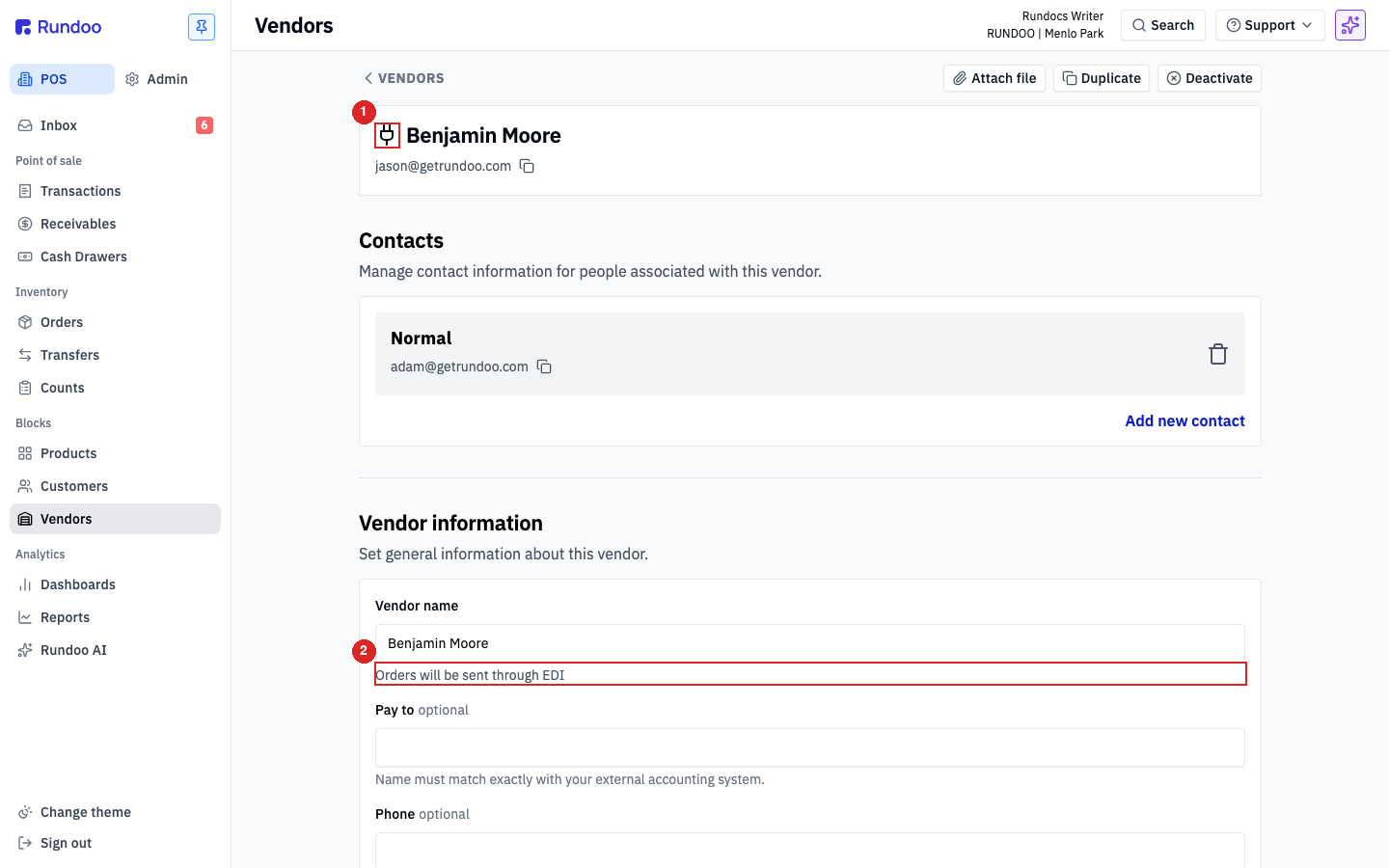
If those two markers haven't appeared after a few business days, True Value's EZ Connect team likely hasn't finished their side yet. Email support@rundoo.ai and we'll chase them down.
Step 3: Set the email fallback (optional)
In the Ordering section, the Orders email field and the Include PDF Order in email / Include XLXS Order in email toggles control the email fallback. With the integration live, POs go over SFTP regardless of what's here, but dealers often keep Orders email set to their True Value rep and Include PDF Order in email on so their rep also receives a PDF copy as a reference. Leave the toggles off if you don't want the duplicate email.
Day-to-day: ordering and receiving
Once the True Value integration is paired, the flows you already know work without a second thought. True Value just becomes the pipe.
Placing a True Value order
Build a PO like any other. Open Orders in the left sidebar, click New order, pick your True Value vendor, add products, and send. Because the vendor is paired to the True Value integration, the send button transmits the order file to True Value over SFTP. The PO lands in your Ordered top tab; True Value's warehouse receives it directly. See Purchase orders for the full PO-building flow.
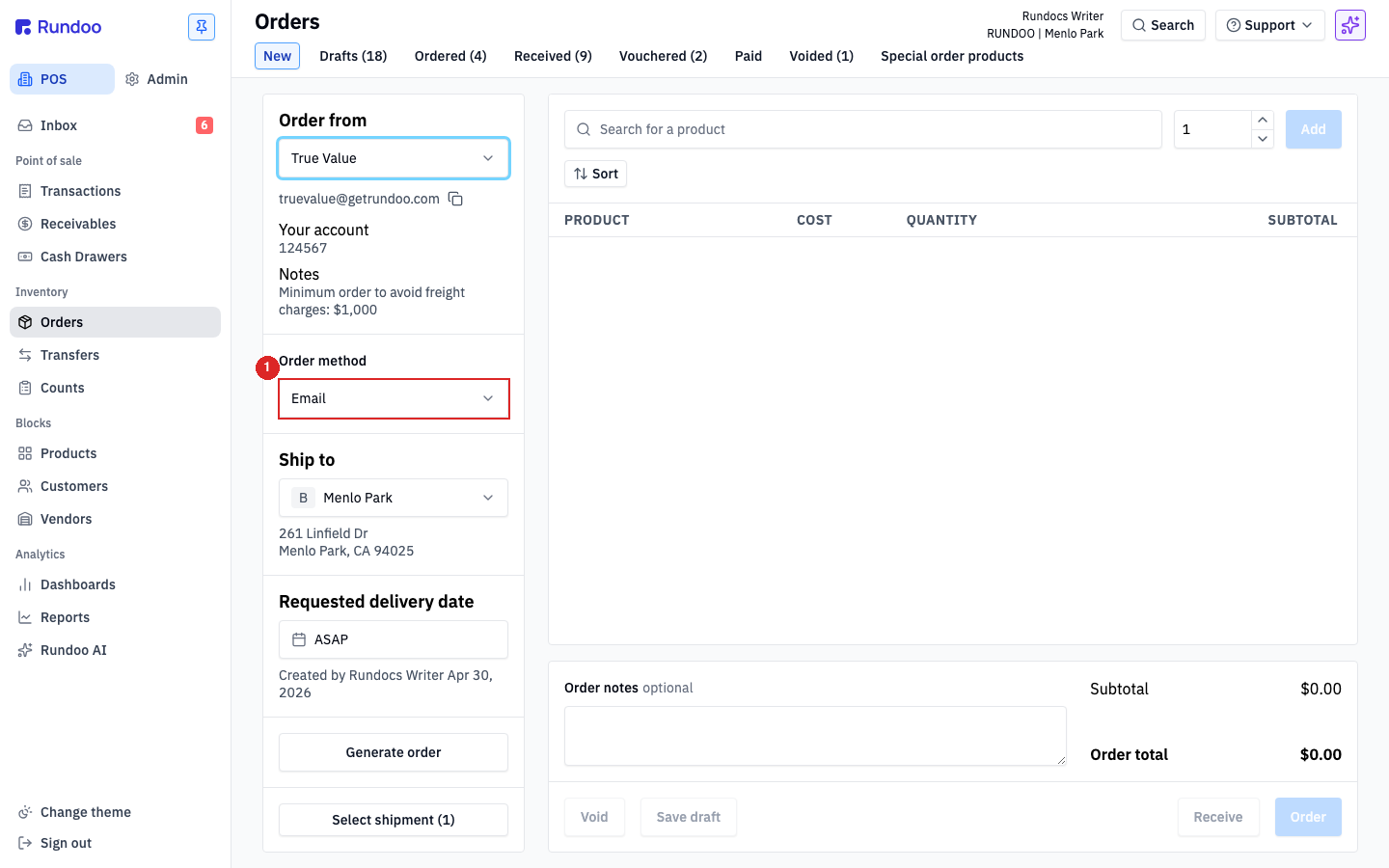
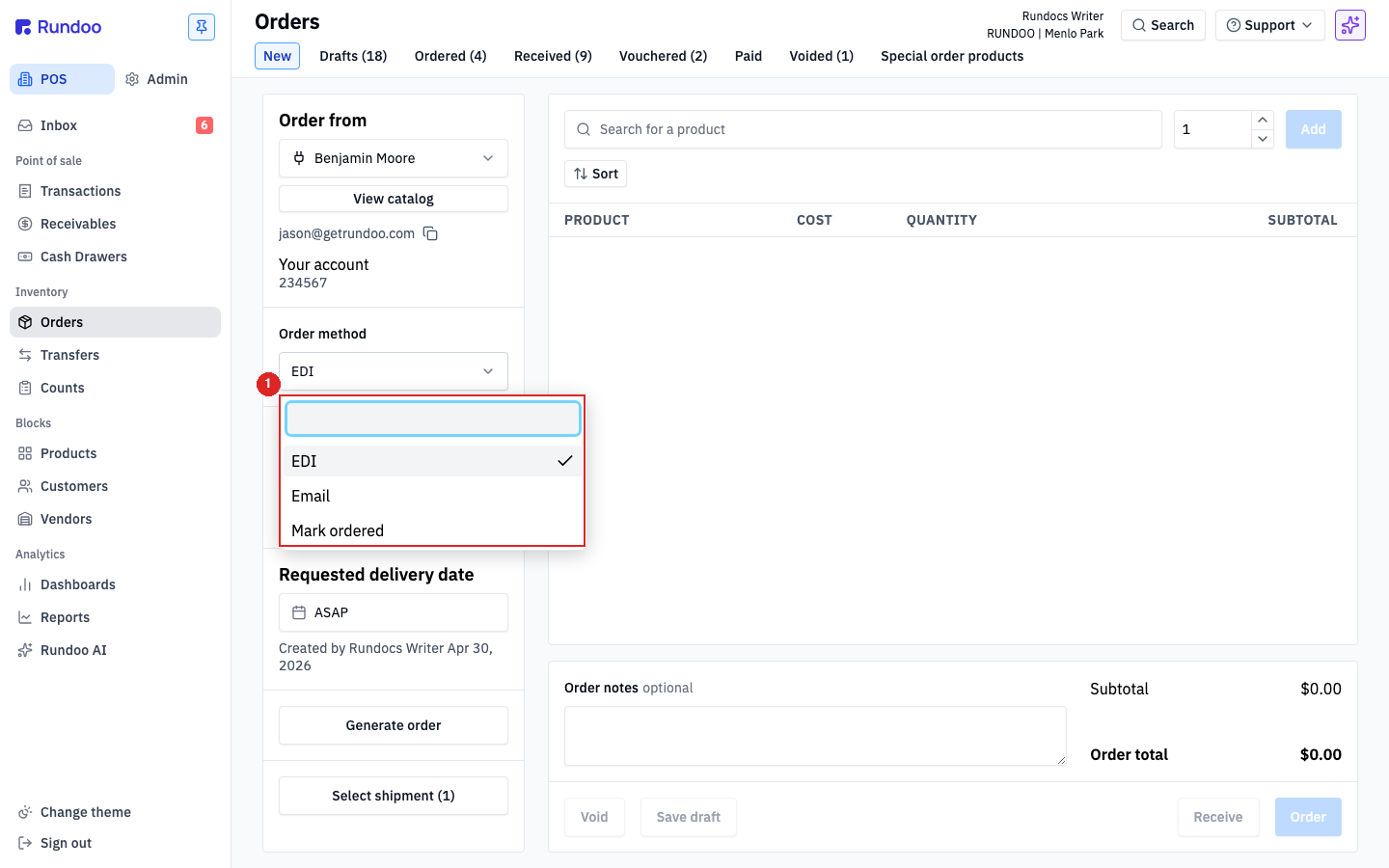
With the integration live, the Order method dropdown on a new PO carries three options when True Value is the selected vendor:
-
EDI, the default once paired. Sends the order file to True Value over SFTP.
-
Email. Falls back to the
Orders emailaddress on the vendor record. Useful for one-off orders you'd rather route to your rep directly. -
Mark ordered. Drops the PO into the
Orderedtab without sending anything externally. Use this when you placed the order outside Rundoo (a phone call, the True Value portal directly) and just need Rundoo to track it.
Don't also email a separate PO to your True Value rep for an order you already sent through Rundoo with Order method set to EDI. True Value's system will receive the SFTP order and a duplicate email PO, and the warehouse can act on both. That's how the same order gets pulled, picked, and shipped twice. If you want your rep to have a copy for reference, use the Ordering section's Include PDF Order in email toggle (Step 3 above) so the PDF rides along with the SFTP send as one coordinated outbound.
Receiving a True Value shipment
When True Value ships product to you, their shipment file flows back to Rundoo so you can receive against the shipment without re-keying line items. Open Orders in the left sidebar and click the Ordered top tab, the True Value shipment appears in the list, vendor set to your paired True Value vendor, line items pre-filled from the shipment file.
Open it and receive it the same way you'd receive any PO, verify quantities against the physical shipment, then submit. See Order receipts for the receiving flow end-to-end.
Auto-created True Value POs are for shipments you asked for. If a shipment file arrives that doesn't correspond to an order you sent, something's off on True Value's side, bring it to Rundoo Support and the EZ Connect team instead of receiving it blind.
Recommended Rundocs
-
Vendors, creating and editing the True Value vendor record the integration pairs to.
-
Purchase orders (building and sending orders, the mechanic the SFTP send rides on).
-
Order receipts (receiving the auto-created
OrderedPOs that True Value's shipment files produce).