
Rundocs › Accounting
Deposits
Last updated 2026-04-30
Deposits are how money lands in your books. Cash and checks dropped at the bank, ACH pulled in from your linked external bank, and customer card / ACH payments that flow through Stripe.
In the Admin mode, open the Finances left tab. The page has two top tabs: Internal is your live Rundoo bank account (the one Stripe pays out to and that holds your card-receivables balance); External is a ledger of your real outside bank account, where you record the cash and checks you physically deposit.
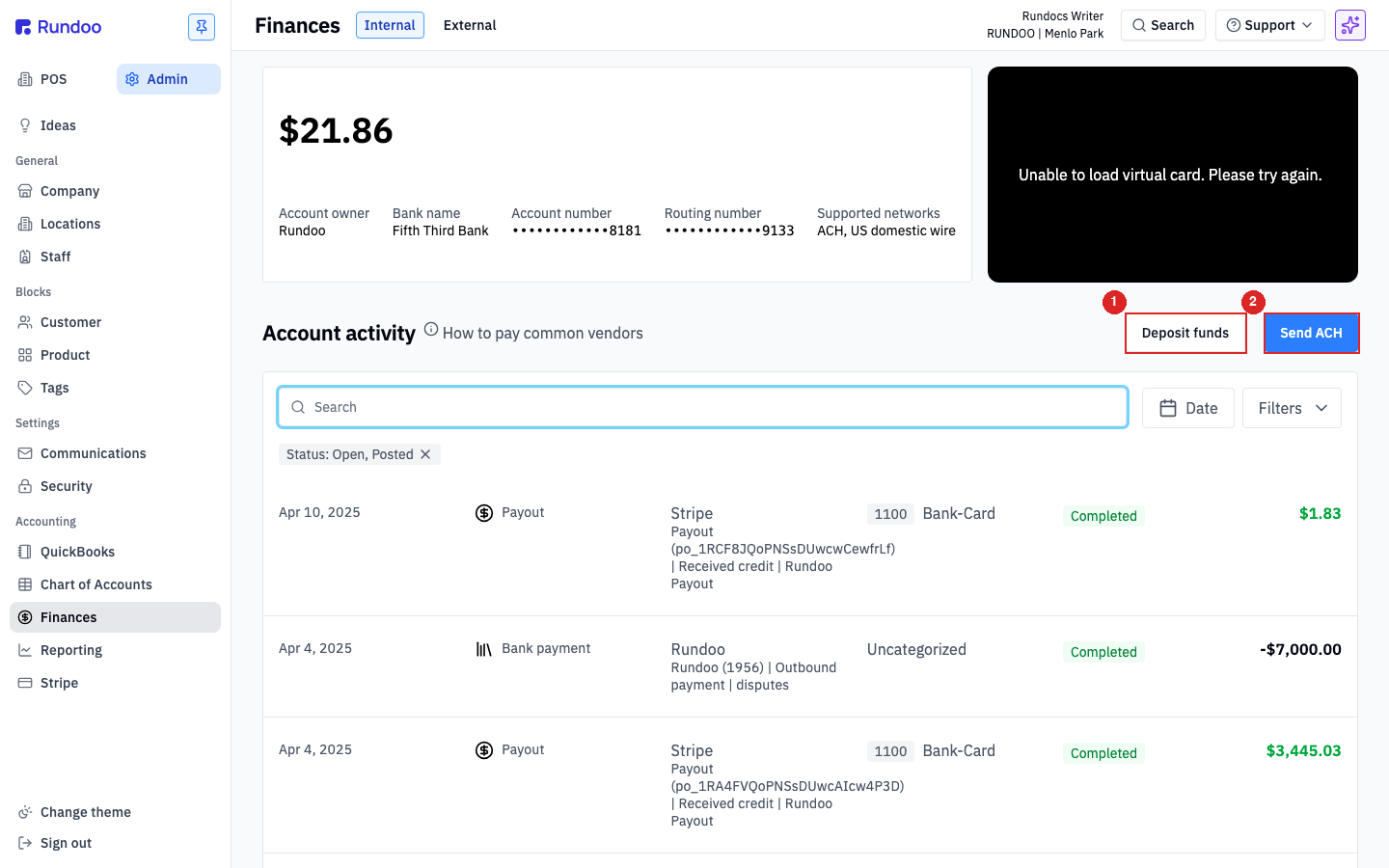
💡 The two tabs answer different questions. Internal = "what's in my Rundoo-managed bank account right now, and how do I move that money?" External = "what cash and checks did I take to my outside bank, and which GL account should each one post to?"
Step 1: Deposit cash and checks at your bank
The cash and checks you collect at the counter never go straight into your Rundoo Internal account (Rundoo doesn't accept physical deposits). You drop them at your real outside bank like always; what you do in Rundoo is record the deposit so the GL knows where the money landed.
Two halves to this:
-
Cash from the till. When you close out the cash drawer at end of day, Rundoo automatically moves that day's cash from the
10000 Cash drawerGL account into the11200 Cash depositsGL account. You don't record it manually. The drop is whatever the close-out'sCash for depositnumber was. See Cash drawer for the close-out flow. -
Checks (and any cash you're depositing outside the close-out flow). Record manually on the External tab.
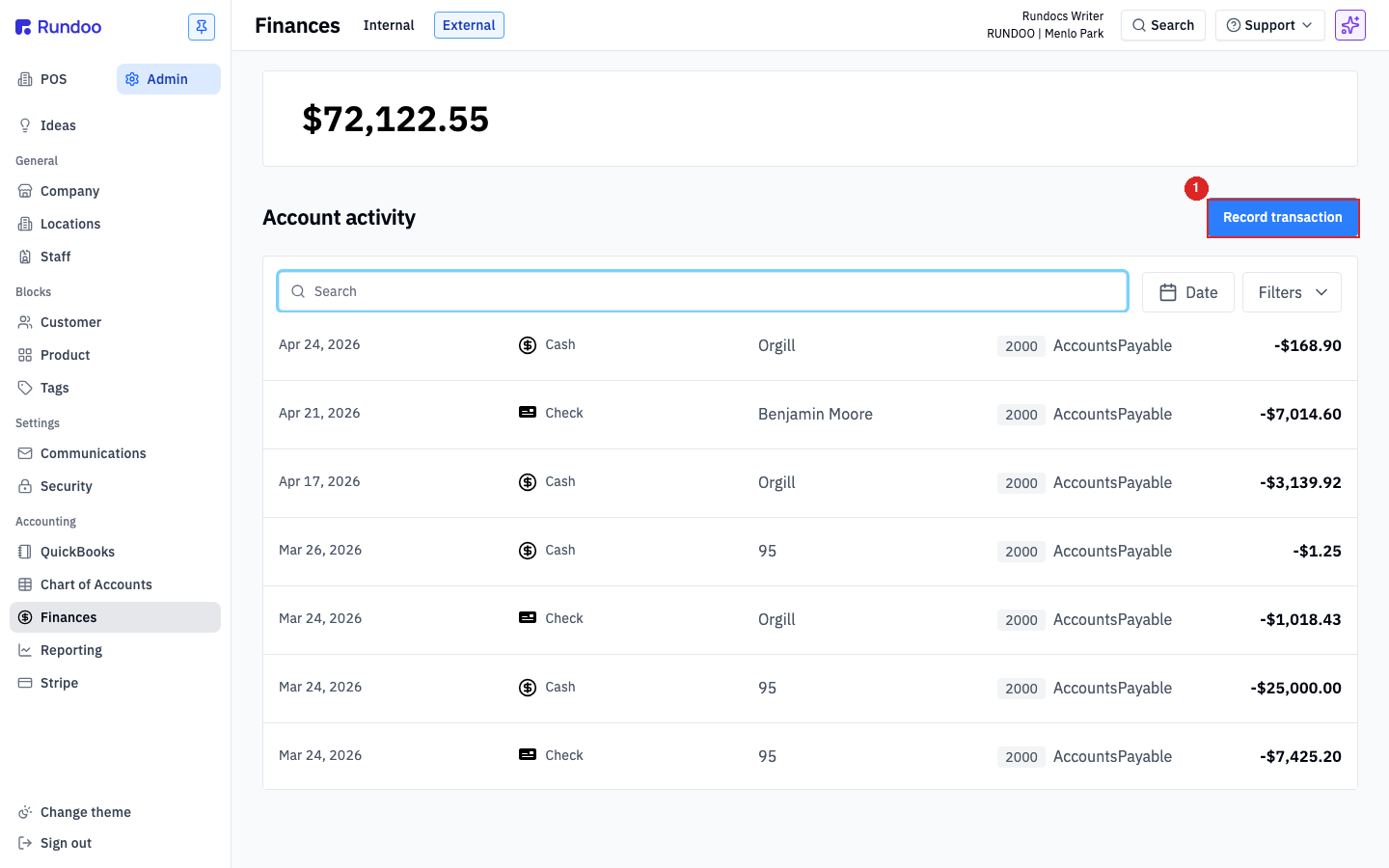
In the Admin > Finances > External tab, click Record transaction in the top-right. The modal opens on the Deposit toggle (vs Payment for outflows).
Fill in:
-
Customer / Vendor (optional). Leave blank for a routine deposit; fill in only when the deposit is tied to a specific party (e.g. a vendor refund check).
-
Amount. The dollar figure on the deposit slip.
-
Date, the day the bank received it. Defaults to Today.
-
Location, which store the deposit ties to.
-
Payment method (
Card,Cash,Check, orBank transfer). PickCheckfor a customer's check,Cashfor cash deposited outside the close-out flow. -
General ledger account. This is the load-bearing field. Set it to
11300 Check depositsfor checks and11200 Cash depositsfor cash. These are clearing accounts that track everything you've deposited but the bank hasn't cleared yet. Picking the right one keeps your Chart of Accounts clean. -
Description (what's on the deposit slip ("Apr 30 deposit, 4 customer checks")).
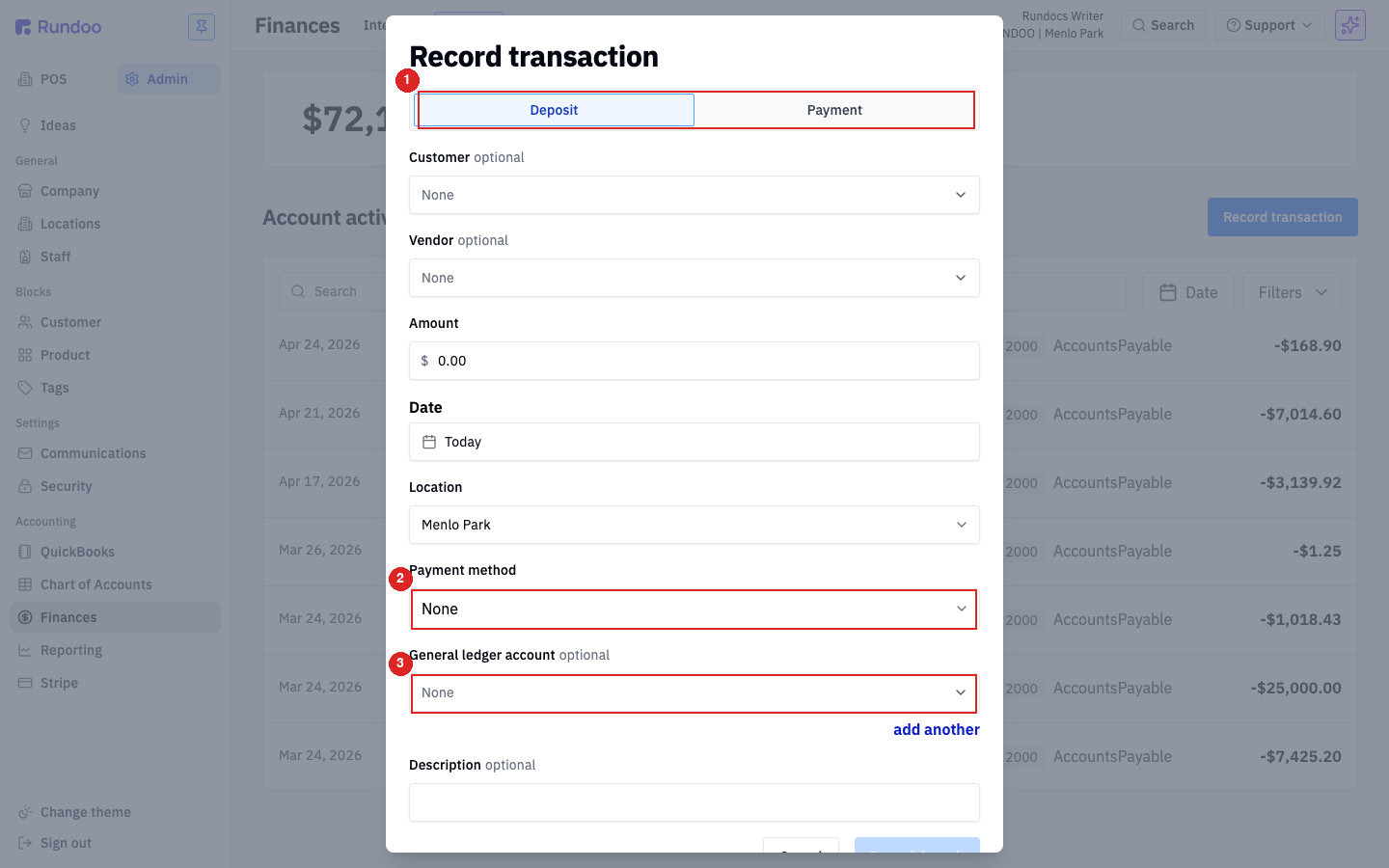
If a single deposit slip mixes cash and checks, hit add another under the GL account field to split the deposit across both accounts in one transaction ($30 cash on one line, $1,750 in checks on another).
Click Record deposit to save.
⚠️ Don't post check deposits to the
11500 ACH depositsaccount. That's a separate clearing bucket for Stripe-initiated customer ACH payments. Mixing checks in there breaks reconciliation against your Stripe payouts.
Step 2: Pull funds from your linked external bank
The Internal account has its own deposit affordance, but it's not for cash or checks. It's an ACH pull from the outside bank you connected in Stripe, into your Rundoo Internal account. Use it when you need cash sitting in Rundoo (to pay a vendor via Send ACH, for example) and your Internal balance is low.
In the Admin > Finances > Internal tab, the top-right shows two buttons: Deposit funds (this section) and Send ACH (covered in Withdrawing funds below).
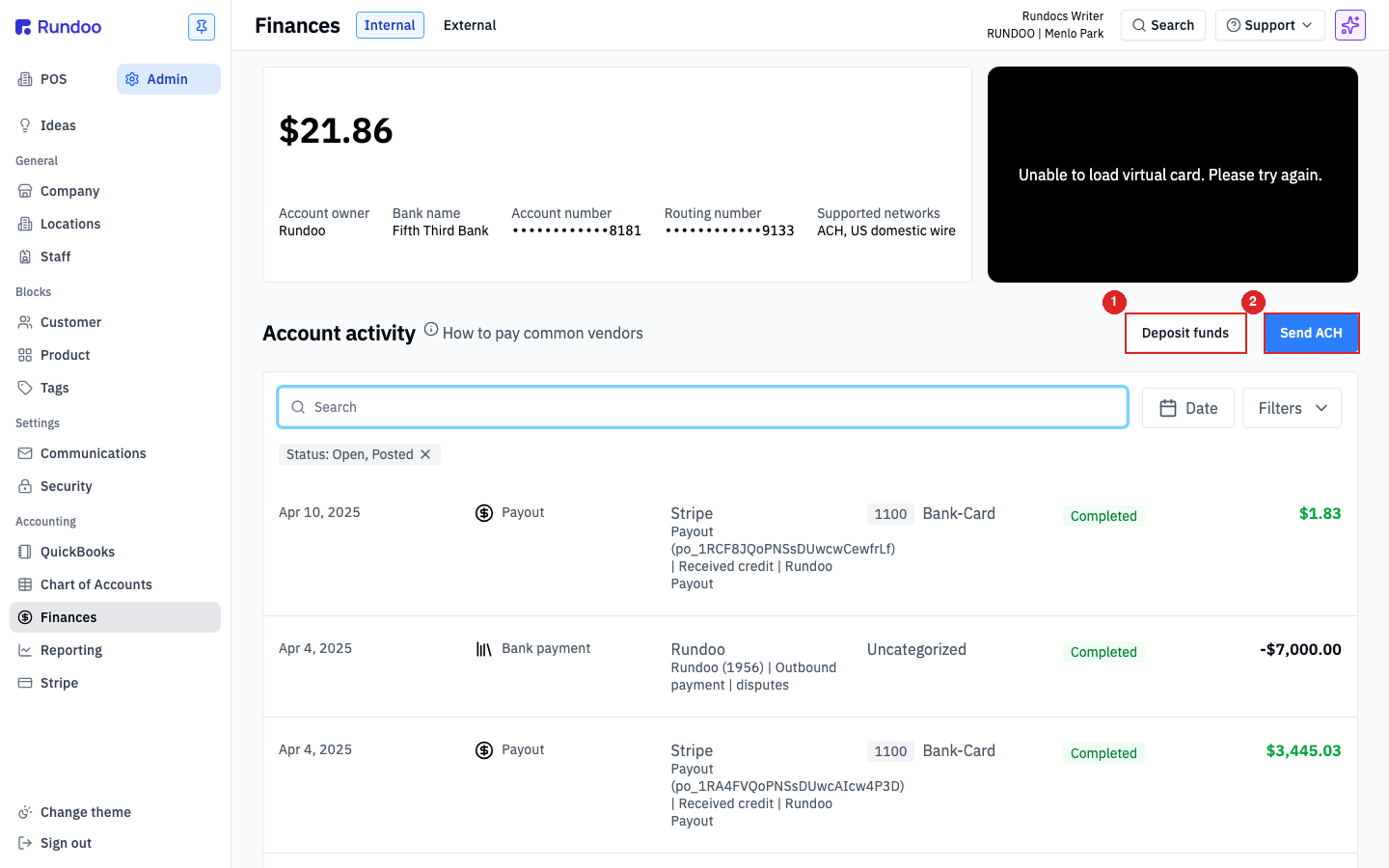
Click Deposit funds. The modal shows the linked external bank Rundoo will pull from (From Fifth Third Bank), the current balance there, and the ACH transit window.
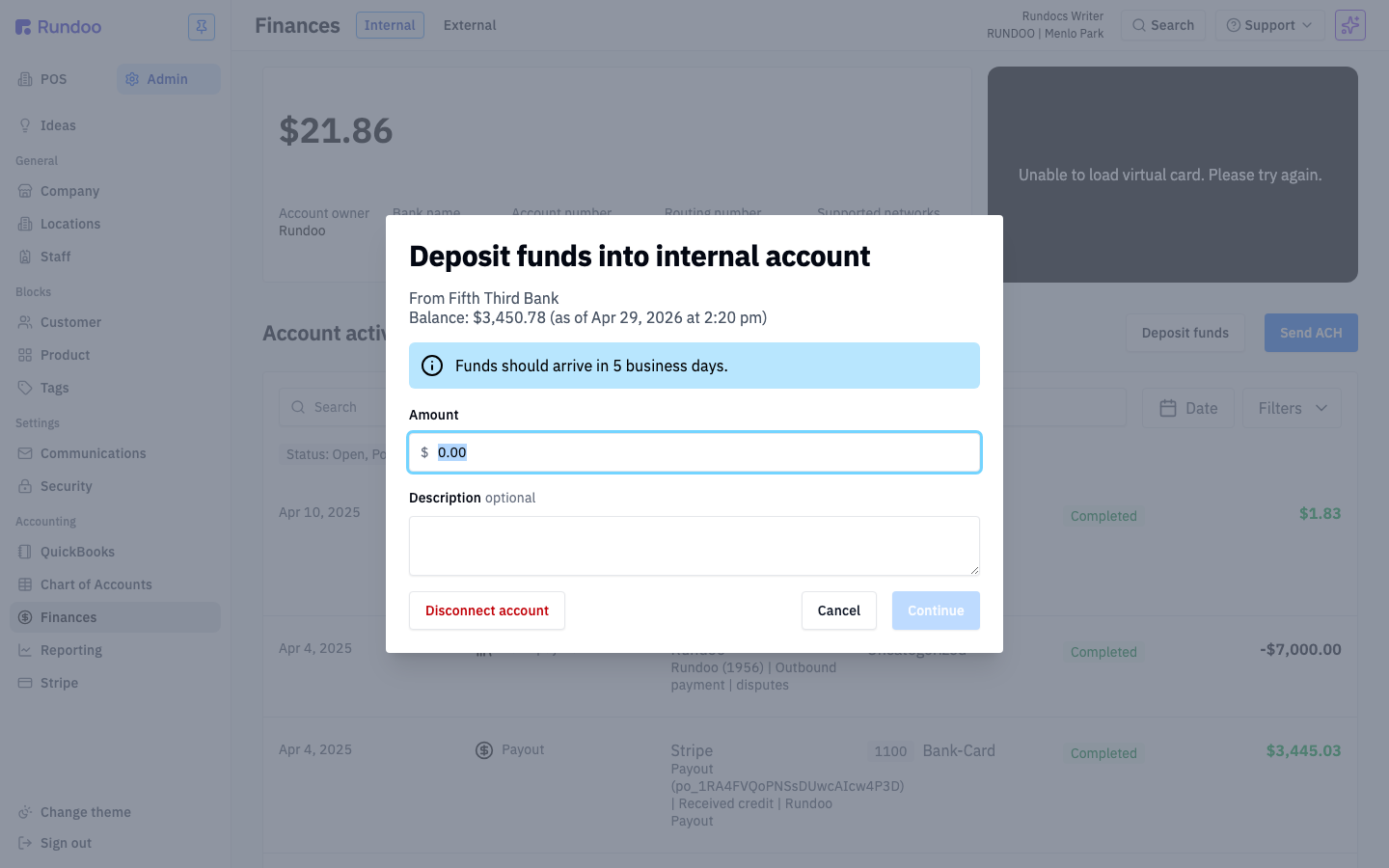
Enter the Amount, an optional Description, and click Continue. Rundoo initiates an ACH pull from your external bank into the Internal account.
⚠️ Funds take 5 business days to land. ACH is slow, if you need cash in Rundoo for a vendor payment today, this isn't the path. The 5-day window is the bank's, not Rundoo's.
💡 If your linked external bank changes (new account, switching banks), use Disconnect account in this same modal and then reconnect via your Stripe settings before the next pull.
Customer card and ACH payments come in automatically
You don't record customer payments here (Rundoo handles them).
-
Card payments taken at POS and through Bill payments flow through Stripe and land as a
Payoutrow in the Internal account'sAccount activitytable on a 1–2 day cadence. Each payout posts to11400 Card deposits. -
Customer ACH payments through Bill payments do the same, posting to
11500 ACH depositsinstead.
Both are visible on the Internal tab as soon as Stripe releases them. See Payouts for what each row means and how to reconcile against Stripe.
Withdrawing funds
The Internal account has one outflow path: Send ACH to a vendor. Click it in the top-right of the Internal tab, pick a vendor, and the funds move from your Internal account to the vendor's account. See Bills & payments for the full flow.
Rundoo does not have an in-product way to move money from Internal back to your linked external bank. If you need to drain funds out of Internal, the path is to send an ACH to your external bank's account and routing numbers using the Send ACH flow. Treat your bank as a "vendor" in Rundoo for this purpose.
💡 Some shops keep the Internal balance intentionally low and pull funds in just before a big vendor ACH run. Others let card-receivables and customer ACH accumulate and run a regular sweep. Whatever rhythm you pick, the Internal balance is yours, Rundoo doesn't auto-sweep it.
Reading the Account activity tabs
Both tabs have an Account activity table at the bottom. The columns mean different things on each:
Internal. Every row is a real money movement on your live Rundoo bank account: Stripe Payouts coming in, Bank payments going out (your Send ACHs), and ACH pulls from Deposit funds. Filter by Status: Open, Posted to see in-flight transactions vs completed ones; the Date and Filters controls in the top-right narrow the window.
External. Every row is a recorded transaction on the GL ledger of your outside bank: each cash and check deposit you booked through Record transaction, plus the day-end auto-postings from cash-drawer close-outs. Each row shows the Payment method icon (Cash / Check / Card / Bank transfer), the Customer or Vendor if you tagged one, the GL account the row posted to, and the amount (negative for outflows, positive for deposits).
Click any row on either tab to open its detail view. Useful for re-checking which GL account a deposit landed in, or confirming a Stripe payout matches the Stripe dashboard.
💡 The
How to pay common vendorslink next to the InternalAccount activityheading points to vendor-specific guidance for Benjamin Moore, True Value, and other distributors that take ACH payments out of Internal. Worth bookmarking if you're new to running Send ACH.
Recommended Rundocs
-
Banking (connecting your external bank to Rundoo via Stripe).
-
Bills & payments (the Send ACH flow and how vendor payments draw from Internal).
-
Cash drawer (close-out, the auto-deposit hand-off, and petty-cash tracking).
-
Account mapping, picking the right GL accounts for cash, check, card, and ACH deposits.
-
Payouts (how Stripe-initiated card and customer-ACH receivables land in your Internal account).