
Rundocs › Accounts Receivable
Finance charges
Last updated 2026-09-07
Finance charges are the interest Rundoo automatically adds to a charge-account customer's overdue balance, sometimes called a late fee or service fee (your policy for customers who don't pay their statement on time). If instead you are looking to remove a delivery, eco, or surcharge line on a sale, that is an additional fee, not a finance charge.
In the Admin mode, open Customer in the left sidebar and scroll to the Finance charges section. That's where you add the rates you offer. To assign one to a specific customer, go to the POS mode, open Customers, click into the customer, and use the Settings tab.
How finance charges work
A finance charge is a rate (a percentage and a few guardrails) that applies to a charge account customer's overdue balance. An overdue balance is any statement balance past its finance term due date (for example, a Net 30 Statement invoice 31+ days old). Rundoo doesn't charge interest while the balance is current, only after it ages past due.
Every charge has five knobs:
-
Percent fee, the rate applied to the overdue balance.
1.5%per month is the industry-standard starting point. -
Compounding, whether previously-assessed finance charges are themselves included in the overdue balance next cycle (see the callout below).
-
Minimum balance to assess. If the overdue balance is under this amount, Rundoo skips the charge for that cycle. Prevents nickel-and-diming a customer who owes $4.12.
-
Minimum fee (if the percent calculation lands below this amount, Rundoo assesses the minimum instead). Ensures the bookkeeping work is worth the charge.
-
Grace period, days after the due date before interest starts accruing.
0 daysmeans the day after due;5 daysgives the customer a short runway.
Compounding vs. non-compounding. A compounding charge assesses interest on the principal plus any previously-assessed finance charges still unpaid (the snowball effect). A non-compounding charge assesses only on the original principal balance, ignoring past finance charges. 1.5% compounding on a $1,000 unpaid balance with $15 of prior charges assesses on $1,015; 1.5% non compounding assesses on $1,000.
You are responsible for following your jurisdiction's laws. Rundoo applies whatever rate you configure. It doesn't enforce usury caps, disclosure requirements, or state-by-state consumer-credit rules. If you're not sure what your state allows, check with your accountant or attorney before turning on interest.
Adding a finance charge
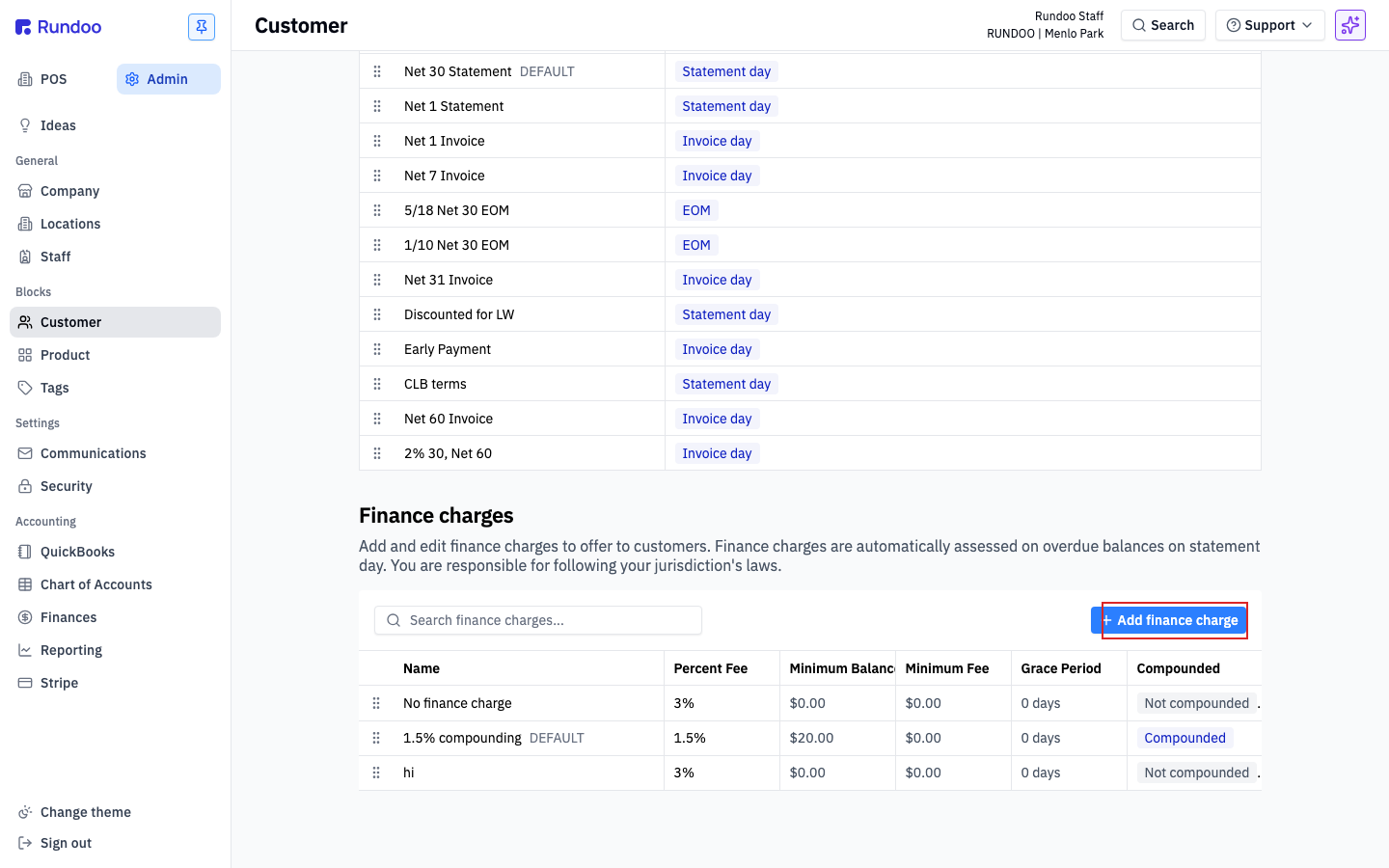
From the Finance charges section, click Add finance charge at the top-right. A modal opens with every field you need.
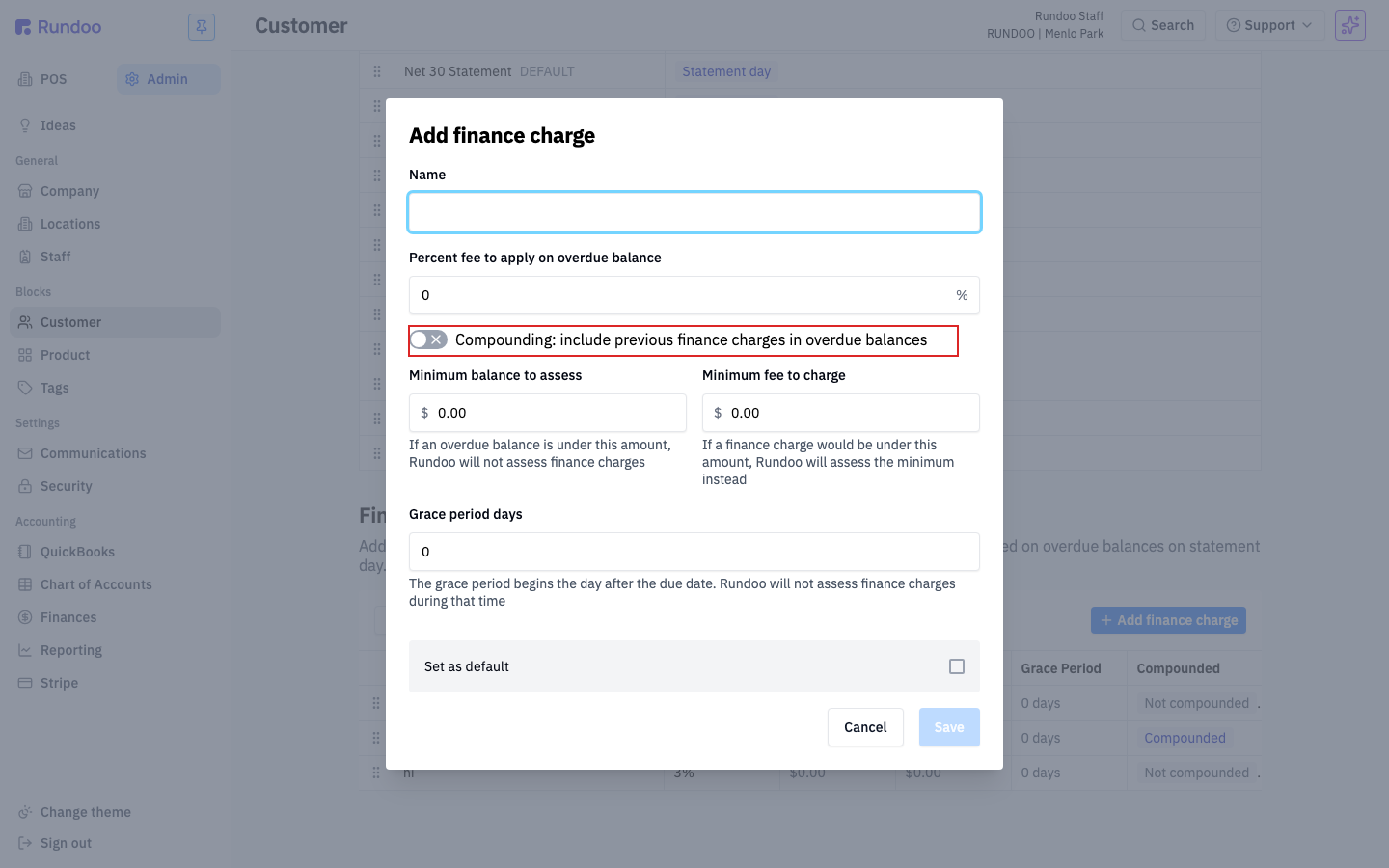
| Field | What it does | Typical value |
|---|---|---|
Name |
How the charge appears in the list and in the customer-settings dropdown. Describe the rate so a cashier can pick it without math (e.g. 1.5% compounding or 1.5% per month non compounding). |
Descriptive string |
Percent fee to apply on overdue balance |
The rate, in percent. Applied once per statement run against the overdue balance. | 1.5 |
Compounding toggle |
On: include previously-assessed finance charges in next cycle's overdue balance. Off: assess only on the original principal. | On for most contractors |
Minimum balance to assess |
Skip the charge entirely if the overdue balance is under this dollar amount. | $20.00 |
Minimum fee to charge |
If the percent calculation lands below this, assess this flat amount instead. | $0.00 (or a small floor like $2.00) |
Grace period days |
Days after the due date before interest starts accruing. The grace period begins the day after the due date. | 0 |
Set as default checkbox |
Apply this charge automatically to new charge-account customers. Only one charge can be the default. Checking it here clears the flag on whichever charge held it before. | Check one |
Click Save. The new charge appears in the list and becomes available on every customer's Settings tab.
1.5% in the percent field means 1.5% per statement run, typically monthly. If your statements go out weekly or quarterly, the same rate compounds very differently. Match the percent to your statement cadence, not to an annualized APR.
Editing a charge
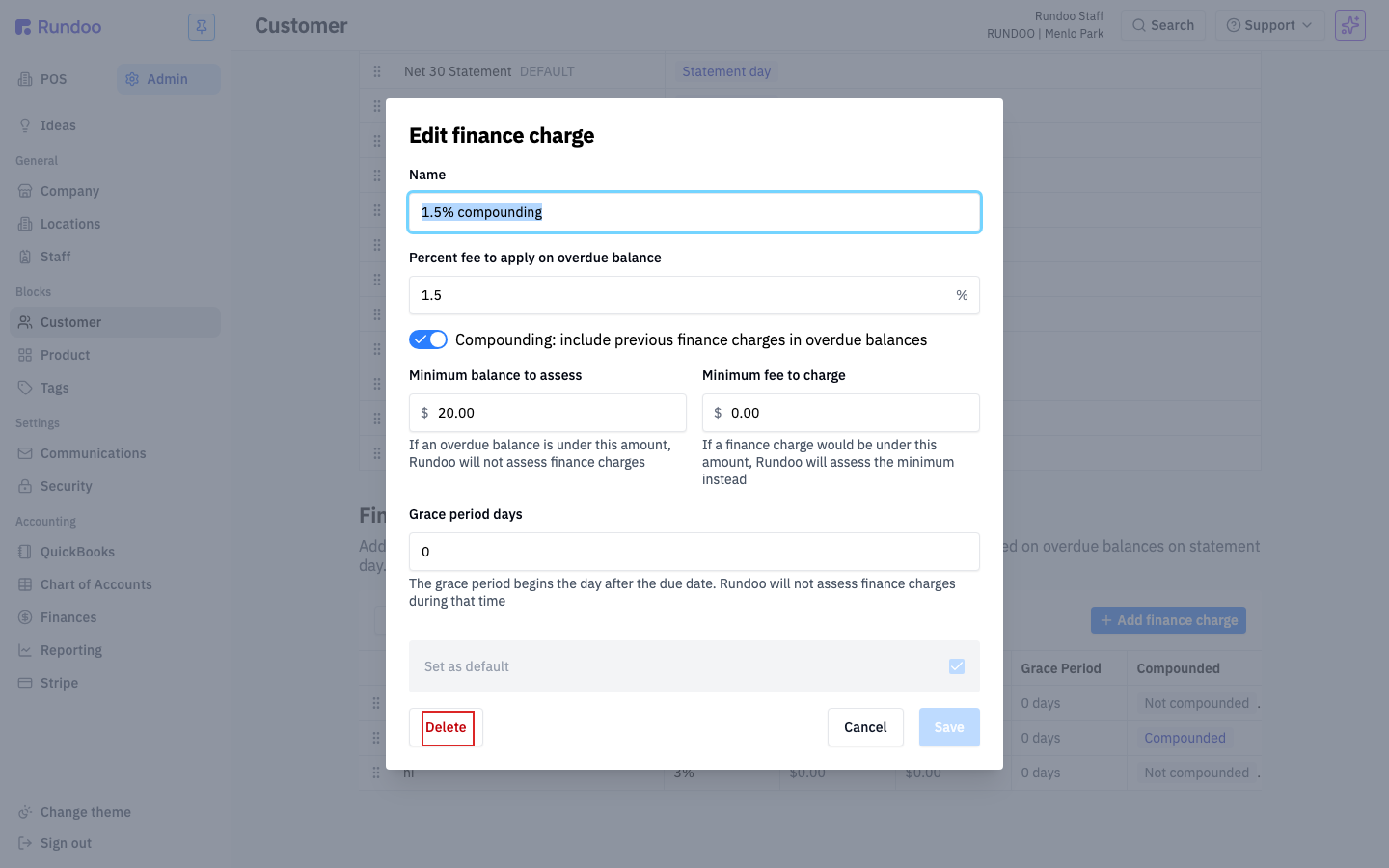
Click any row in the Finance charges list to open the Edit finance charge modal (same form as the Add modal), pre-filled with the current values. A Delete button sits at the bottom-left.
Edits take effect on the next statement run. Charges already assessed on past statements don't change retroactively; the new rate applies going forward.
The default charge can't be deleted in place. If the charge you want to delete is the current default (marked DEFAULT in the list), the Set as default box is locked. To delete it, first open a different charge and check Set as default there, then come back and delete the old one.
Assigning a charge to a customer
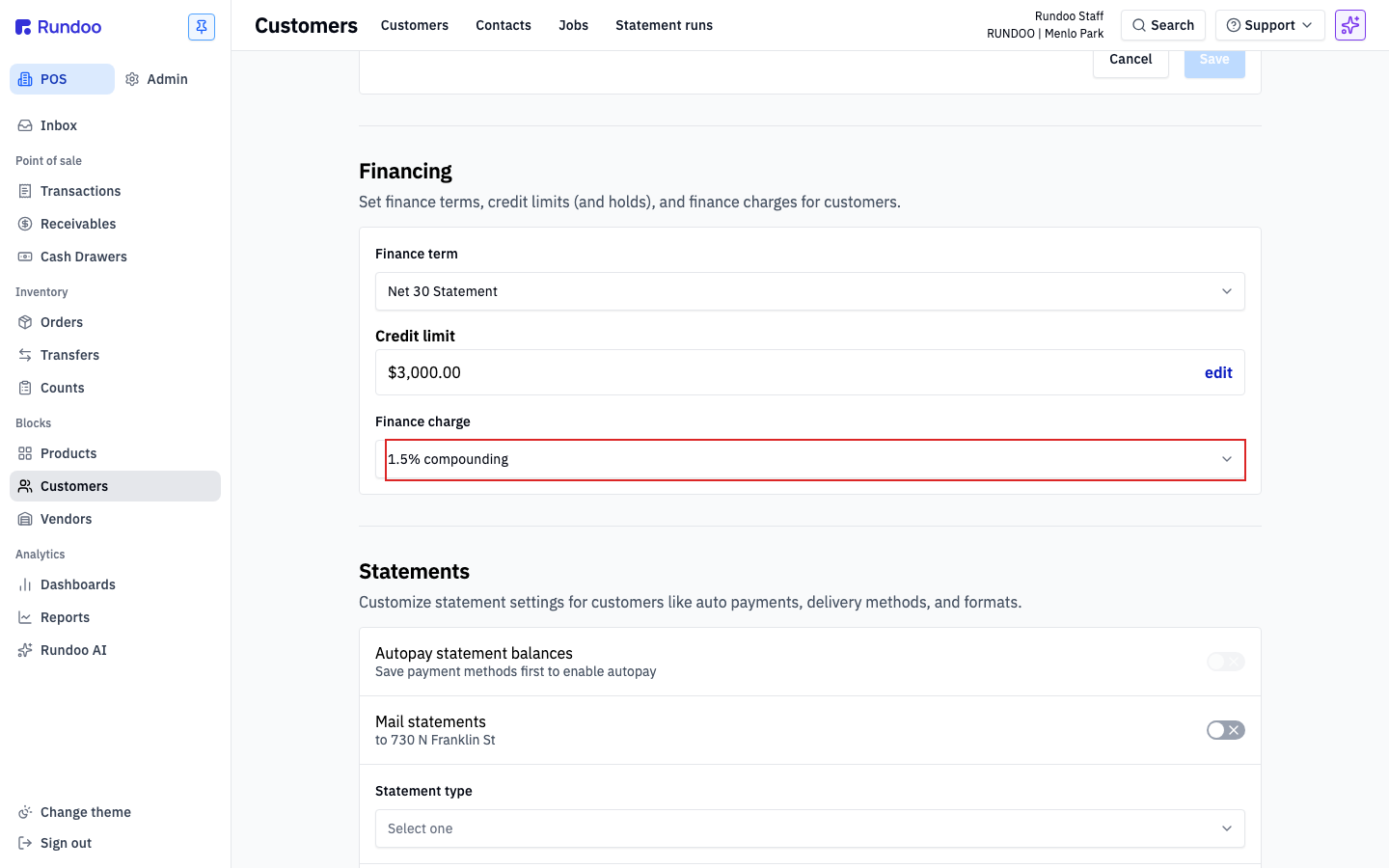
A finance charge only does anything once it's assigned to a charge-account customer. In the POS mode, open Customers, click into the customer, and click the Settings tab. Scroll to the Financing section, that's where Finance term, Credit limit, and Finance charge live side by side.
Pick a charge from the Finance charge dropdown. Leave it as Select one if you don't want to charge this customer interest (for example, a big anchor contractor you'd rather not risk annoying). If you've marked a charge as the default, every new charge-account customer will land on it automatically, you only need to touch this field for exceptions.
A finance charge doesn't do anything on a retail customer. Retail customers pay every time at the counter, so there's no overdue balance to assess. If the dropdown shows no value and you'd expect interest, check that the finance term is statement-based, not Cash.
When charges get assessed
Finance charges run automatically as part of a statement run, on the customer's statement day. There's no separate "run finance charges" button. Generating statements and assessing interest are the same action. For every charge-account customer with a finance charge assigned and an overdue balance above the minimum, Rundoo:
-
Looks at the customer's overdue balance as of the statement date, skipping any part of the balance still inside the grace period.
-
Multiplies by the configured percent, using compounding or not per the charge's setting.
-
Compares the result to the minimum fee and uses the higher of the two.
-
Adds the finance charge as a line on that month's statement and rolls it into the customer's total balance.
Assessed finance charges show up under POS > Receivables > Finance charges tab (the full history of interest Rundoo has charged, across all customers).
Finance charges assess every statement run, not every day. If you run statements monthly, a past-due balance accrues once a month. Running statements off-cycle (an ad-hoc run for one customer) can also trigger a charge if the prior balance is past due. Be deliberate about when you run, don't double-charge by running the same customer twice in a month.
Waiving a charge (voiding an assessed finance charge)
Sometimes you decide not to make a customer pay a finance charge Rundoo already assessed (a good customer who was a few days late, a billing you'd rather not fight over). You waive it by voiding the charge, which reverses it so it stops counting against the customer's balance.
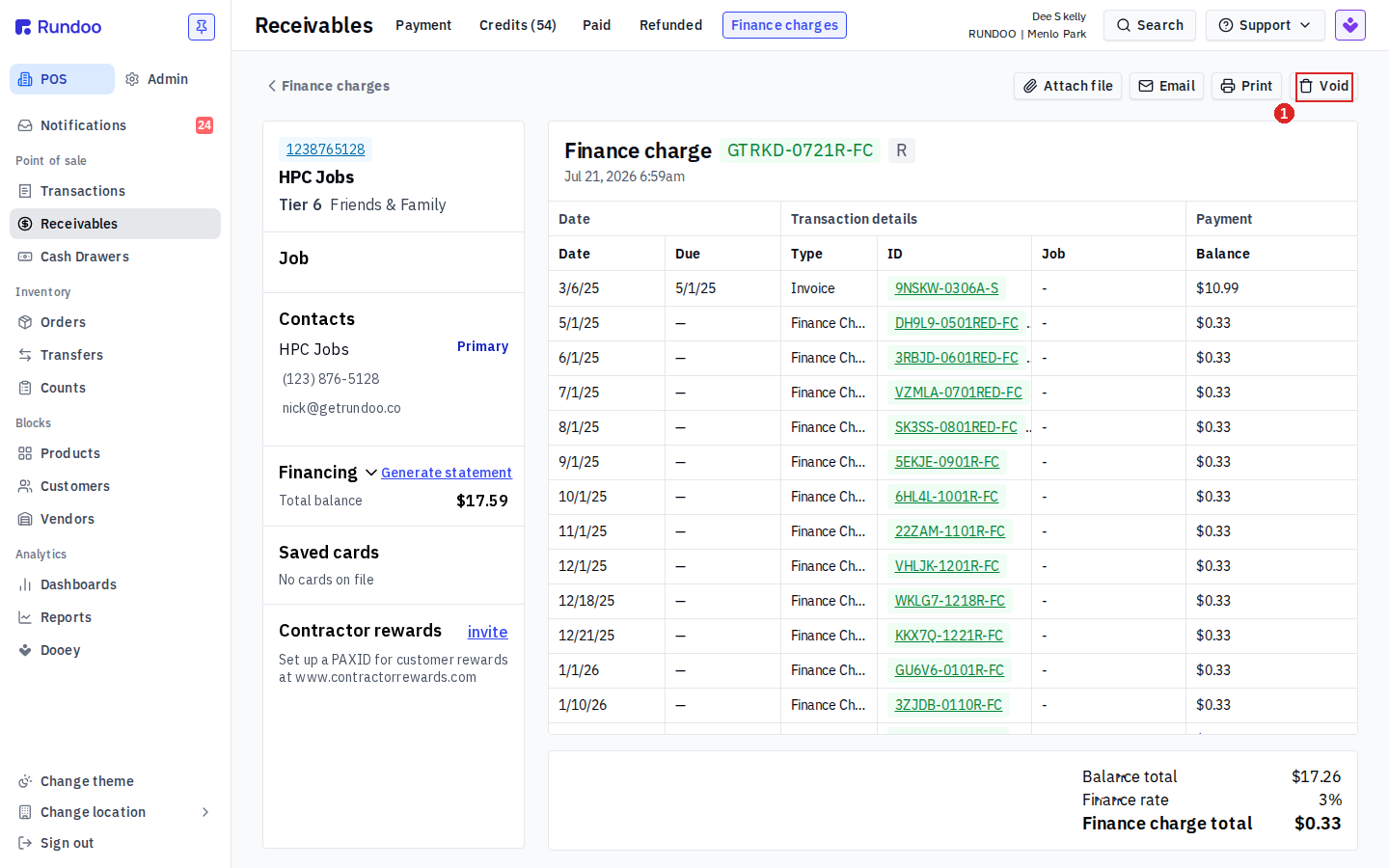
Every finance charge Rundoo has assessed lives under POS > Receivables, on the Finance charges tab. Each row shows the charge's reference, the customer, when it was assessed, the amount, and how many overdue balances it covered.
-
On the Finance charges tab, click the charge you want to waive. Its detail opens, showing every overdue balance the charge was calculated on and the finance charge total at the bottom.
-
Click Void in the action bar at the top-right, then confirm Void Finance Charge? with Void.
Rundoo confirms with Finance charge voided and drops the charge off the list. The charge is reversed, so it no longer adds to what the customer owes.
You can't void a finance charge the customer already paid. If the Void button is greyed out, a payment has already been applied to that charge. At that point it's settled, not waivable, reverse it as a credit or adjustment on the customer's account instead (or reach out to Rundoo support).
Voiding waives this cycle, not the next one. Finance charges assess automatically on every statement run against any balance that's still past due. If the underlying invoice remains overdue, the customer will be charged again on the next run. To stop it recurring, address the root cause too: get the overdue balance paid, clear the Finance charge on the customer's Settings tab, or widen the grace period.
Recommended Rundocs
-
Customers (creating and editing customer records, retail vs. charge accounts).
-
Finance terms (configuring the
Net 30 Statement/Net 1 Statementterms that define when a balance becomes overdue). -
Statements (running the month-end statement that assesses finance charges).
-
Bill payments (taking a payment to pay down a charge-account balance before interest hits).