
Rundocs › Integrations
Banking
Last updated 2026-07-22
Rundoo Banking is a Fifth Third Bank account that holds your sales proceeds, lets you send ACH payments to vendors, and lets you pull funds in from a connected outside bank. All from one tab in Admin.
In the Admin mode, open the Finances tab in the left sidebar (the Internal sub-tab is your Rundoo bank account).
What's on the Internal tab
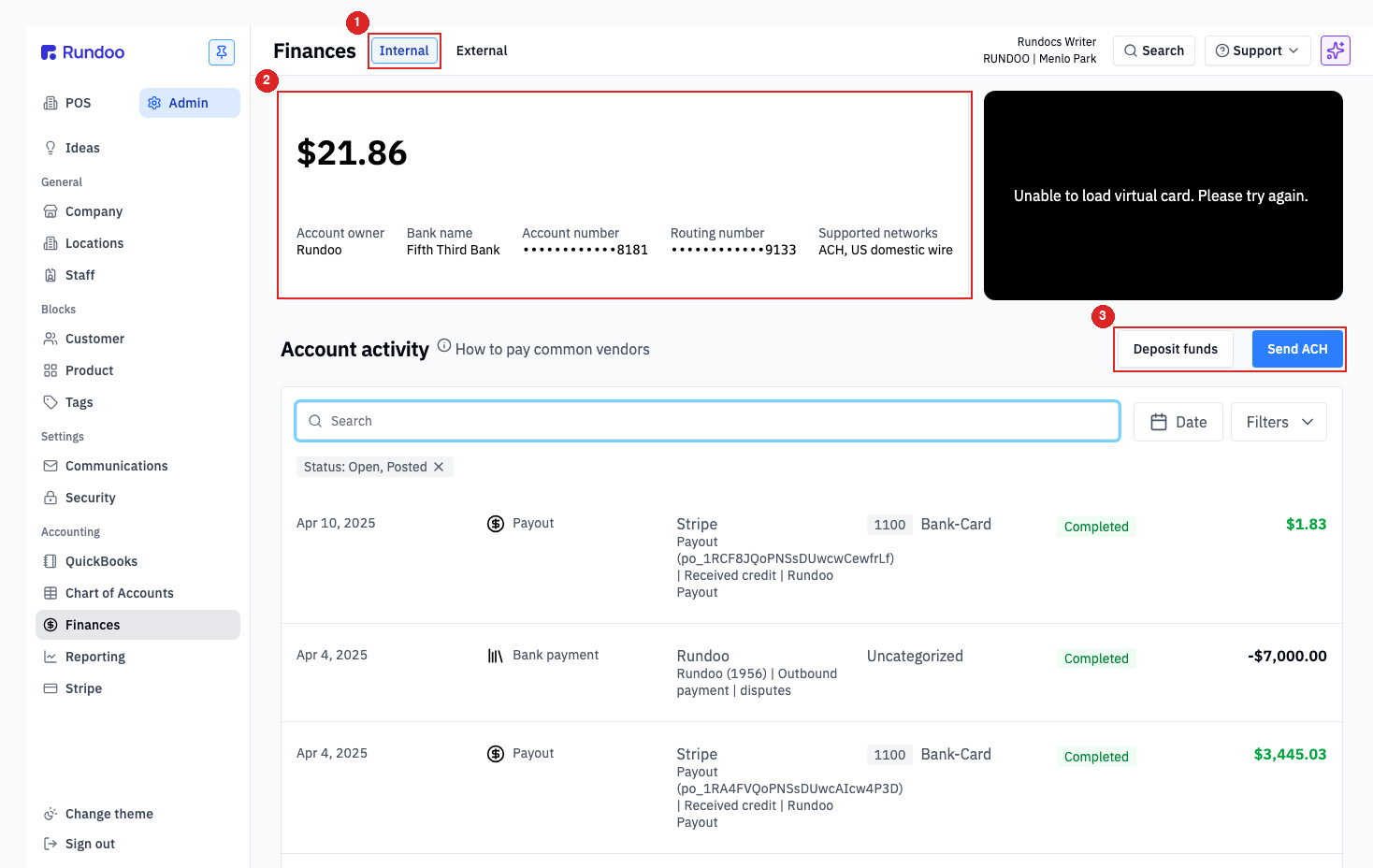
Three things sit on this page:
-
The
Internalsub-tab (the Rundoo bank account view). The siblingExternalsub-tab is for outside-Rundoo cash and check transactions you want to keep on your books (covered below). -
Account card. Your current balance and the bank details Rundoo holds on file: -
Account owner, your business name on the account.
-
Bank name,Fifth Third Bank. Every Rundoo banking account is held at Fifth Third Bank, N.A. -
Account numberandRouting number, masked by default. Customers and vendors paying you by ACH need these; for security, copy them from this page rather than emailing them around. -
Supported networks,ACH, US domestic wire. ACH is what you'll use day-to-day; wires are accepted into the account from senders who require them.
- Action cluster.
Deposit fundspulls money in from a connected outside bank,Send ACHpushes money out to a vendor.
The table below the card is your full account ledger. Every Stripe payout coming in, every ACH going out, and any inbound credits or fees. Filter by Date, by Status: Open, Posted (the default, Pending, Failed, and Canceled are hidden), or by the Filters chevron for amount and direction.
Rundoo is a financial technology company, not a bank. Your funds are held at Fifth Third Bank, N.A., a Member FDIC institution, through Stripe Treasury. The full compliance disclosure is at the bottom of the Internal tab.
Sending ACH to a vendor
Pay a vendor straight from your Rundoo balance. No third-party bill-pay tool needed.
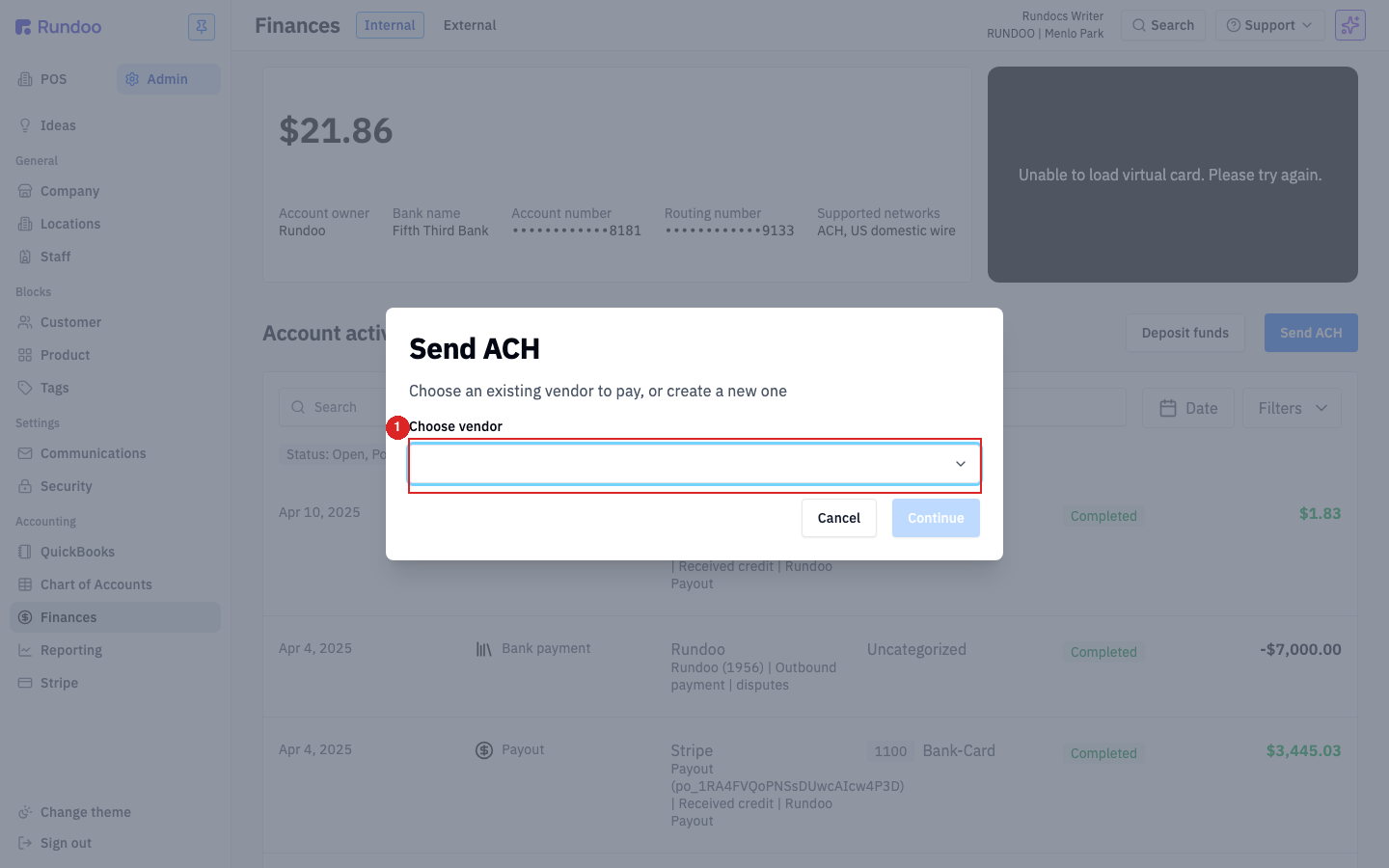
Click Send ACH (top-right of Account activity) and pick the vendor in the Choose vendor dropdown. The dropdown lists every Vendor in your Rundoo with bank details on file; if your payee isn't there, add them as a vendor first with their account and routing numbers, then come back. Hit Continue, enter the amount and an optional memo, and the payment leaves on the next ACH window.
No fee on ACH-out. Rundoo doesn't charge a fee to send an ACH payment to a vendor from your Internal balance. The full amount you enter leaves your account and lands with the vendor.
ACH transfers usually settle in 1–2 business days. There's no "cancel" once it's been sent. Double-check the amount and the vendor's bank info on the confirm screen before hitting send.
Connecting an outside bank
Before you can deposit funds in or push ACH out, you need to link an outside business bank to your Rundoo Internal account. The link is one-time, once it's in place, Deposit funds and Send ACH both use it.
When no outside bank is linked, the top-right of Account activity shows a Connect account button (in place of Deposit funds). Click it and Rundoo opens Stripe Financial Connections in a popup: search for your bank, sign in with your online-banking credentials, and confirm a one-time verification code. When the popup closes you're back on the Internal tab, the bank's name and current balance show up inside the Deposit funds modal, and Connect account flips back to Deposit funds.
To swap to a different bank, open Deposit funds and click the red Disconnect account button at the bottom-left of the modal. That fires immediately, no confirm dialog, and the action cluster flips back to Connect account. Re-link the new bank from there.
Disconnect account is a single-click action (there's no "are you sure?" step). Only click it when you actually want to break the link.
Depositing funds from your outside bank
Deposit funds pulls money from a separate business bank account into your Rundoo balance (useful for funding the account, covering a refund, or paying down a vendor when sales haven't kept up).
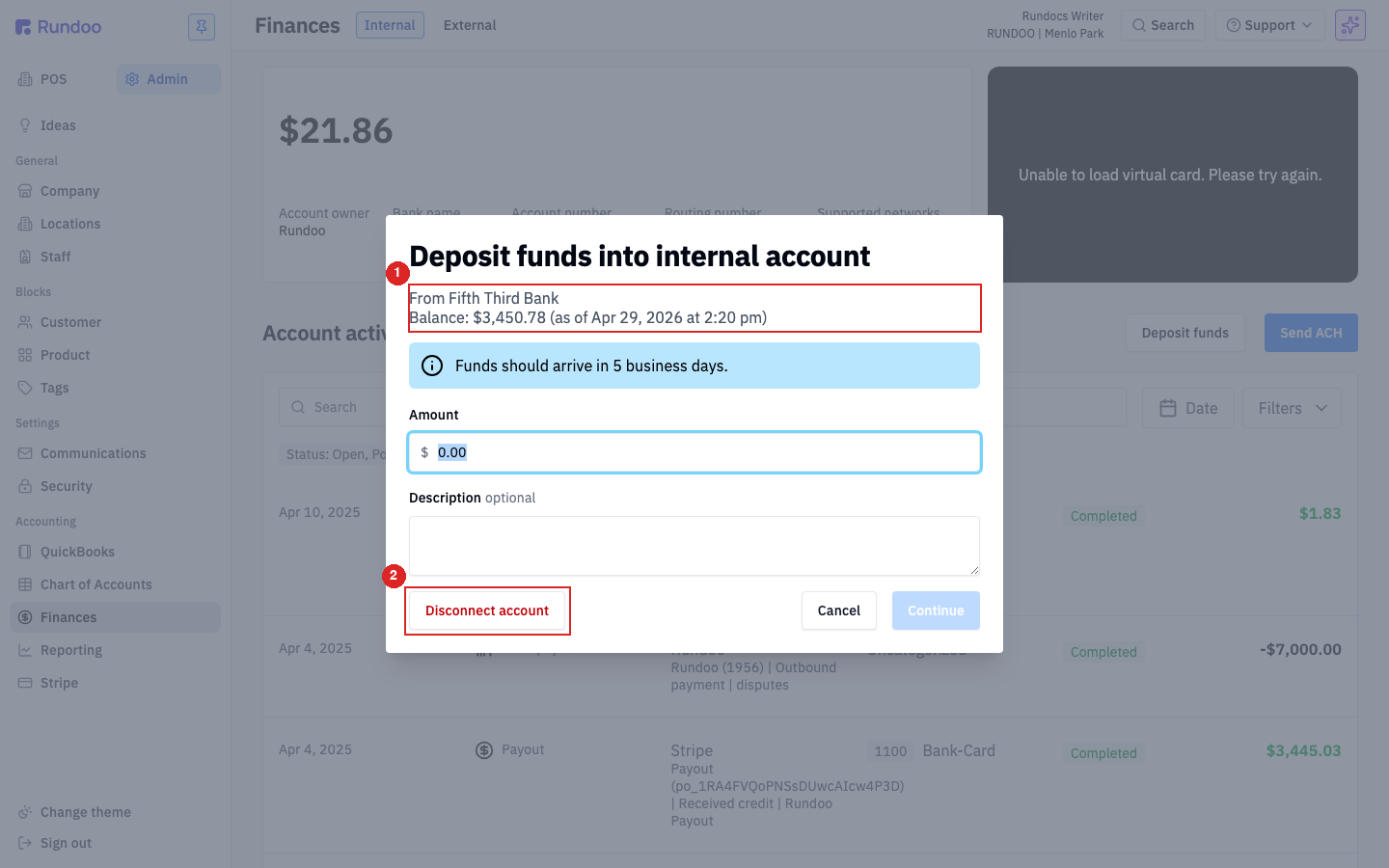
-
Subtitle shows which outside bank is connected and its current balance (
From Fifth Third Bank, Balance: $3,450.78 (as of Apr 29, 2026 at 2:20 pm)in this example). If no outside bank is connected yet, the modal walks you through linking one via Stripe Financial Connections (your bank login + a one-time verification code). -
Disconnect accountremoves the outside bank link. See Connecting an outside bank above for the swap-banks flow.
Enter the Amount, an optional Description for your records, and hit Continue.
Deposits arrive in your Rundoo balance in 5 business days. ACH-out from your other bank using the Internal tab's Account number and Routing number is faster (1–2 days), useful when you need funds in quickly.
Cards
The Internal tab includes a virtual card linked to your Rundoo balance, useful for online vendor purchases, software subscriptions, or any business spend you want categorized straight into your chart of accounts. Card transactions land in the same Account activity ledger as your Stripe payouts and ACH transfers, so they post to the GL automatically.
Cards are provisioned by Rundoo Support, not self-served. To activate, freeze, replace, or change the limit on your card, email support@rundoo.ai or call (650) 334-3205.
Account activity
Every dollar in or out hits the Account activity ledger. The most common rows you'll see:
| Row type | What it means |
|---|---|
Payout from Stripe |
Daily settlement from Stripe of your card and ACH receivables sales (credits the 1100 Bank-Card GL account). |
Bank payment (outbound) |
An ACH you sent via Send ACH, or a chargeback debit. |
Deposit (inbound) |
A Deposit funds pull-in from your connected outside bank. |
| Card transactions | Virtual or physical card spend. Categorize to a GL account from the row. |
Each row has a Status pill (Completed, Pending, Failed) and a GL account chip. If a row is Uncategorized, click into it to assign a Chart of Accounts entry. That's how Banking activity flows into your P&L and Balance Sheet.
What's on the External tab
The External sub-tab is not a second bank account. It's a manual ledger for cash and checks that bypassed your Rundoo Internal account. If you handed a vendor a paper check or paid in cash from the till, log it here so the expense lands in your books.
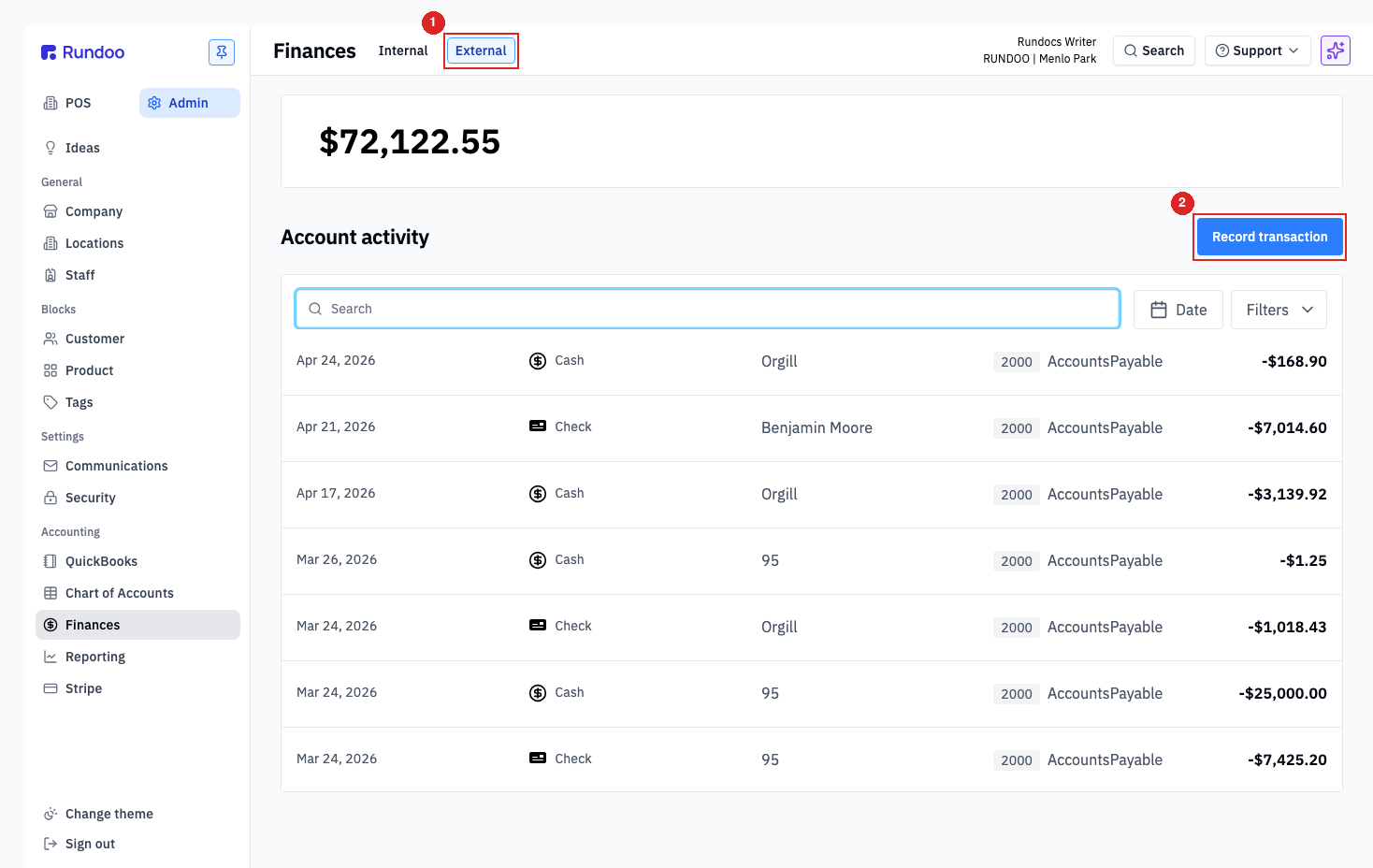
-
The
Externalsub-tab (a separate running balance and ledger for outside-Rundoo transactions). -
Record transaction. Opens a modal withDeposit/Paymenttoggle,CustomerorVendorpicker (optional),Amount,Date,Location,Payment method(Cash,Check, etc.), and an optionalGeneral ledger accountandDescription. Saved rows show up in the External ledger and post to the GL.
Rundoo's Internal account is the one with a bank, account number, and ACH rails. Use External for any payment that physically left your store as cash or check without touching Rundoo.
Where Fifth Third fits
Rundoo banking is powered by Stripe Treasury, with funds held at Fifth Third Bank, N.A. (Member FDIC). In practice:
-
Rundoo is the front-end you log into (every Banking page in this Rundoc).
-
Stripe Payments Company is the licensed money transmitter that moves the funds.
-
Fifth Third Bank, N.A. is the chartered bank that holds the deposits.
This pass-through structure is how you get FDIC eligibility on your Rundoo balance (up to $250,000 per depositor, per FDIC rules). The full compliance language sits at the bottom of the Internal tab, useful to point your accountant or auditor at when they ask "where exactly is the money?"
Recommended Rundocs
-
Stripe, the processor side of the same money flow: card payments, payouts, and reconciliation.
-
Vendors, adding the bank details that let you pay a vendor by
Send ACH. -
Chart of Accounts (how Banking activity maps into your books).