
Rundocs › Accounting
Chart of Accounts
Last updated 2026-08-31
The Chart of Accounts is the list of GL accounts Rundoo posts to, the spine that turns every sale, payment, order, and stock movement into a journal entry your accountant can read.
In the Admin > Chart of Accounts > Accounts tab, you'll see every account in your ledger with its number, name, and type. The Mapping tab on the same page is where you tell Rundoo which account each kind of transaction should post to, see Account mapping for that side.
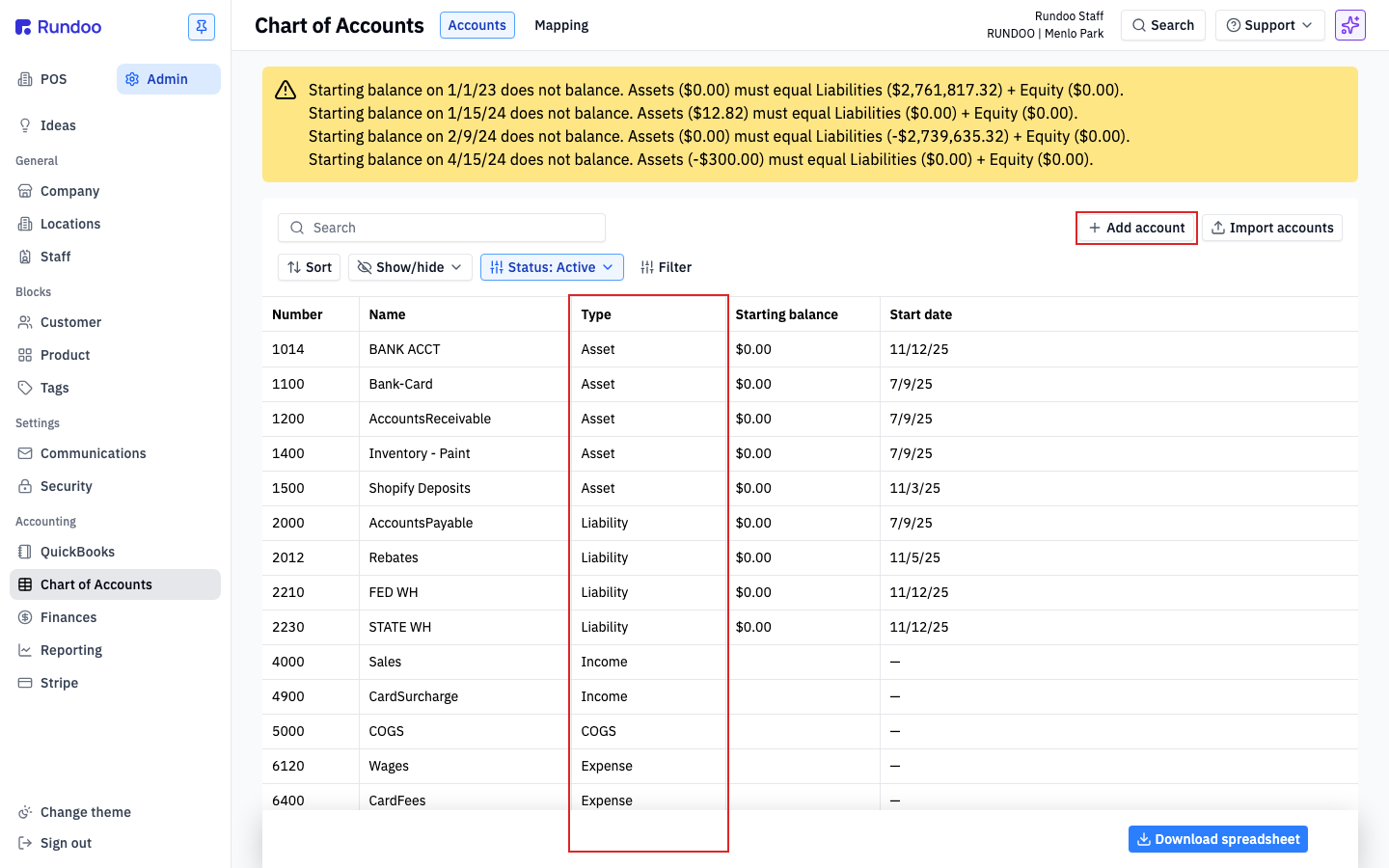
Account types Rundoo uses
When you add an account, Rundoo asks you to pick one of six types. They're the standard GL categories (if you've set up a Chart of Accounts in QuickBooks or Xero, these will look familiar).
| Type | What it holds | Examples in Rundoo |
|---|---|---|
Asset |
What the business owns. | Bank accounts, merchant card deposits, inventory value, accounts receivable. |
Liability |
What the business owes. | Sales tax payable, payroll withholdings, accounts payable, customer credits. |
Equity |
Owner's stake (opening balances, retained earnings, draws). | Owner's equity, retained earnings. |
Income |
Revenue the business earns. | Sales, card surcharges billed back to customers, freight income. |
COGS |
Cost of goods sold, the cost side of every sale. | COGS is its own type in Rundoo (not lumped in with Expense) so your gross margin calculation stays clean on the Profit & Loss. |
Expense |
Operating costs. | Wages, card processing fees, rent, utilities. |
Rundoo uses Income, not "Revenue". Pick Income for any account that receives money earned from sales.
The standard Rundoo accounts
Rundoo ships every new company with a pre-seeded Chart of Accounts so you can start posting from day one. The numbers follow the standard 1000-series-per-type convention, Assets in the 1000s, Liabilities in the 2000s, Equity in the 3000s, Income in the 4000s, COGS in the 5000s, Expenses in the 6000s.
Typical accounts you'll see out of the box:
-
Assets (1000s) (
BANK ACCT,Bank-Card,Accounts Receivable, andInventoryaccounts (per-department, e.g.Inventory - Paint)). -
Liabilities (2000s).
Accounts Payable,Retained earnings payable, and the sales-tax-payable accounts tied to each location's tax rate. -
Income (4000s),
Sales(the catch-all sales account),CardSurcharge(credit-card surcharges billed back to customers). -
COGS (5000s).
COGS(The default cost-of-goods-sold account hit on every sale). -
Expenses (6000s),
Wages,CardFees(card processing expense).
Your Rundoo onboarding team sets up the account numbers that match your existing books. If you already have a Chart of Accounts in QuickBooks or on paper, tell your implementation manager and we'll mirror it so the exports line up with what your accountant expects. Any accounts you need that aren't in the starter set (payroll withholdings, Shopify deposits, a second bank, a tip liability) can be added yourself from the Add account flow below.
Adding an account
If you need an account Rundoo doesn't ship with (a second bank, a new expense category, a tip liability, a separate inventory account for a new department) add it yourself.
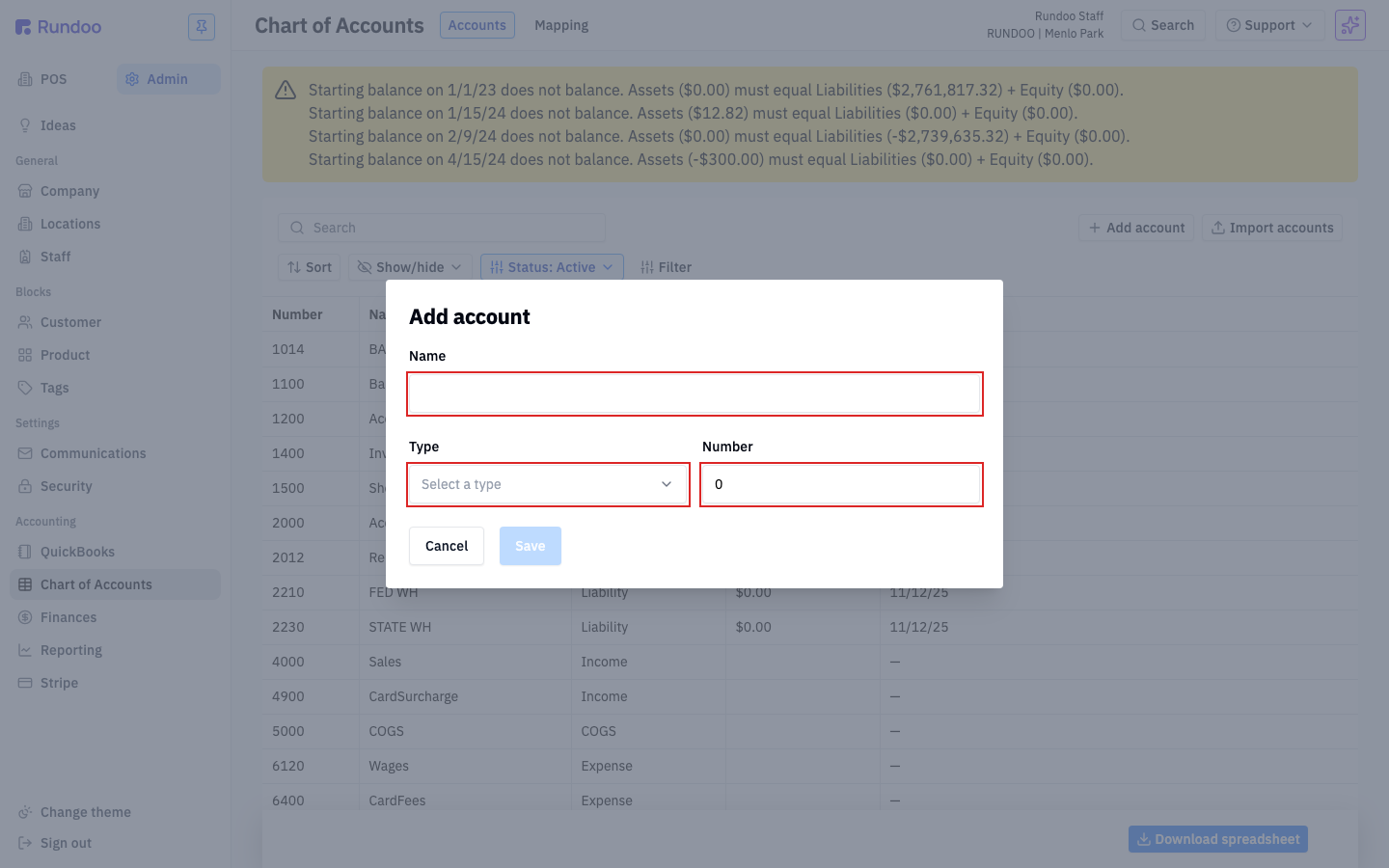
In the Admin > Chart of Accounts > Accounts tab, click Add account in the top-right. The modal asks for three things:
-
Name (how the account will appear on the list and on journal entries). Match the naming your accountant uses in QuickBooks if you can; it makes reconciliation easier.
-
Type (pick from
Asset,Liability,Equity,Income,COGS, orExpense). -
Number (the GL number). Keep it inside the 1000-series-per-type convention so reports stay readable.
Click Save and the account joins your list. It's available immediately for mapping.
Adding an account doesn't start it posting to anything on its own. A new account is just an empty bucket until you wire it up on the Mapping tab (see Account mapping for how transactions find the right account).
Editing or deactivating
Click any row on the Accounts tab to open the Edit account modal.
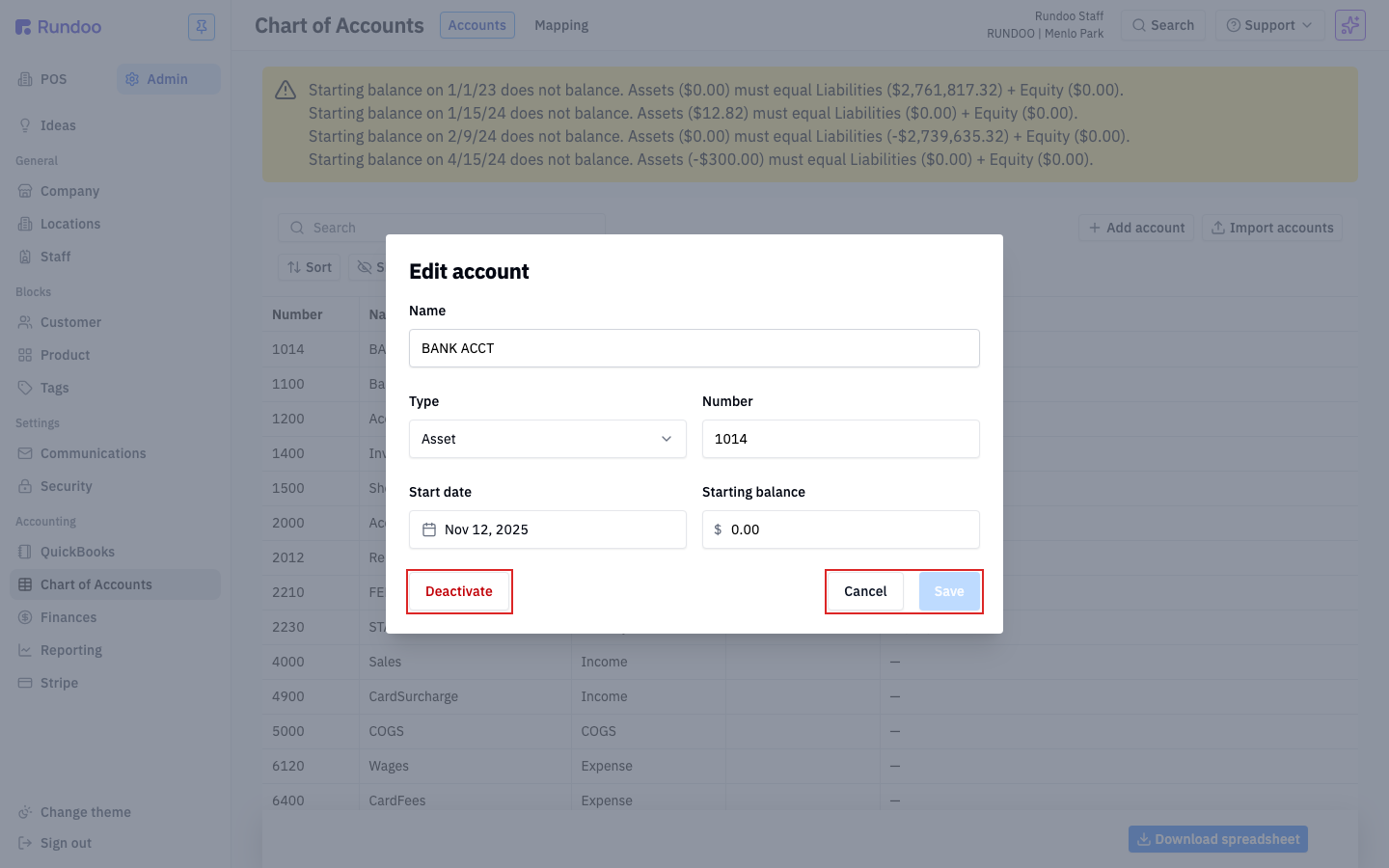
You can change the Name, Type, and Number, then Save. You can also deactivate the account with the red Deactivate button in the bottom-left. Deactivating removes it from your active list (filtered by Status: Active at top of the page) but doesn't delete historical postings. Any journal entry that already hit the account stays intact on your P&L and Balance Sheet.
If an account is wired into the Mapping tab, deactivate with care. Transactions that used to post to it need a replacement, otherwise new postings will fail until the mapping is updated. Switch the mapping first, then deactivate.
Starting balances have moved. They used to live on each account here (a Starting balance and Start date field per account). Now you set opening-day balances as a single balanced entry in Manual journal entries instead, so an account row is just its number, name, and type. See that Rundoc for how to import your opening-day balance sheet at cutover.
How transactions post to accounts
Every time Rundoo writes a journal entry (a sale rings up, a bill payment comes in, a PO is received, an inventory count is posted) it looks up which accounts to debit and credit on the Mapping tab.
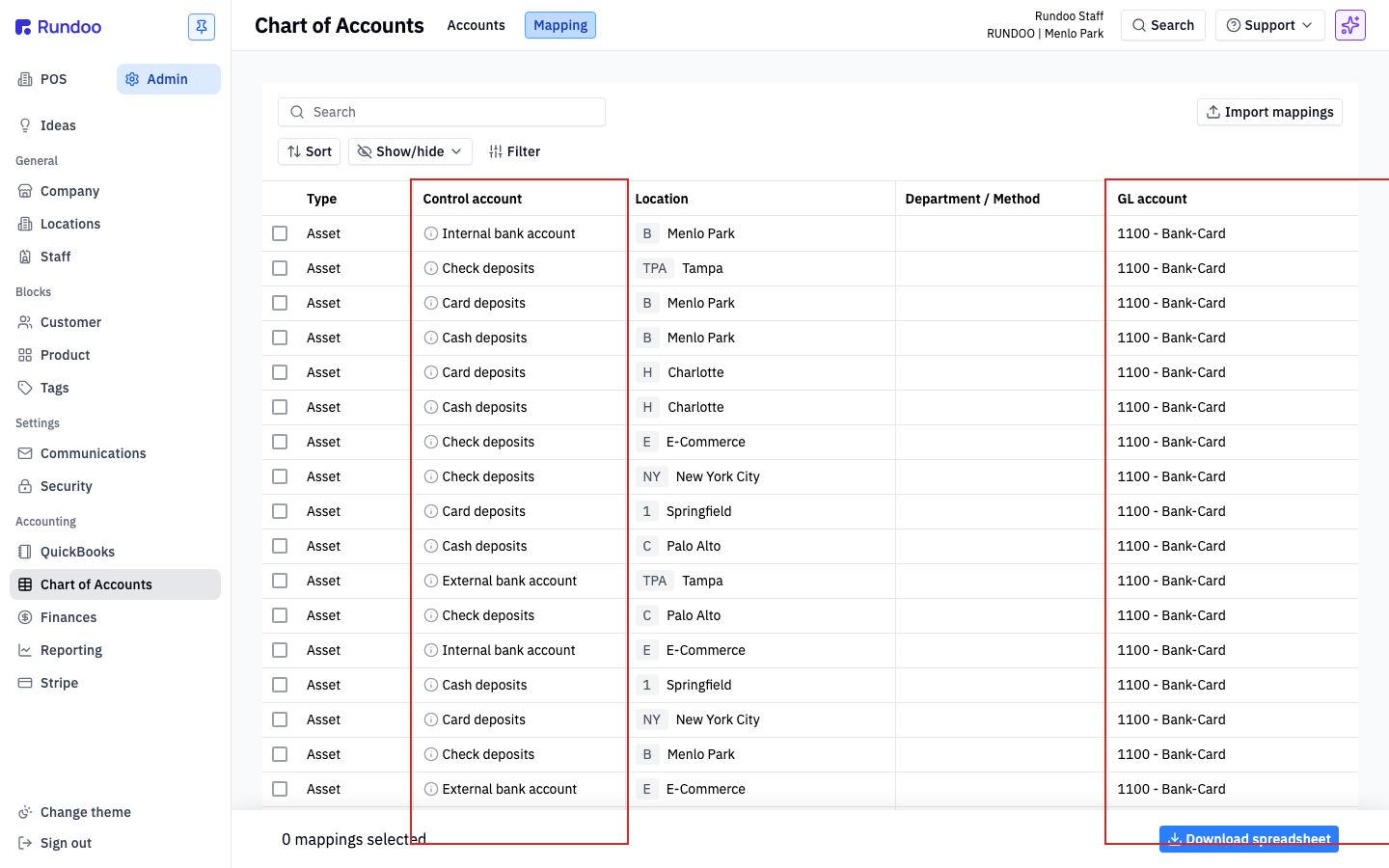
The mapping is the translation layer: a POS sale knows it needs to debit "card deposits" and credit "sales," but which specific Asset account is your card-deposit account, and which Income account is your sales account? That's what Mapping answers, and it's scoped by location, so a Menlo Park card deposit can land in a different bank account from a Palo Alto card deposit.
A few common postings:
-
A cash sale (debits your cash
Assetaccount, credits yourSalesIncomeaccount, credits the location's sales-taxLiabilityaccount, debitsCOGS, creditsInventory). -
A bill payment from a charge-account customer. Debits the tender method's
Assetaccount (bank, card deposits), creditsAccounts Receivable. -
A received purchase order (debits
Inventory, creditsAccounts Payable). -
An inventory count adjustment, debits or credits
Inventoryagainst an inventory-variance expense account.
See Account mapping for the full routing table and how to change which account a transaction posts to.