
Rundocs › Admin & Settings
Card surcharges
Last updated 2026-09-09
A card surcharge is an optional percent Rundoo tacks onto card-tender sales to recover processing fees, shown as a separate Card fee (N%) line on the sale and the receipt. This is the setting you change to adjust the card fee charged to customers, or to lower it to comply with a legal cap (for example, dropping a 3% surcharge to 2.4%).
In the Admin mode, open the Communications tab. The Card payment surcharge section sits between Statements and Loyalty points. This is not the same as the read-only Card fees field on the Company tab, which shows Stripe's processing cost to you and can't be edited. See Card fee vs card surcharge below.
What card surcharges are
Every card swipe, tap, or keyed-in charge costs the store a processing fee. A card surcharge is how Rundoo can pass a percent of that fee through to the customer when they pay with a card, it shows up as a Card fee (N%) line in the totals stack, calculated off the Sale total (subtotal + tax). Cash, check, and charge-account sales never see it.
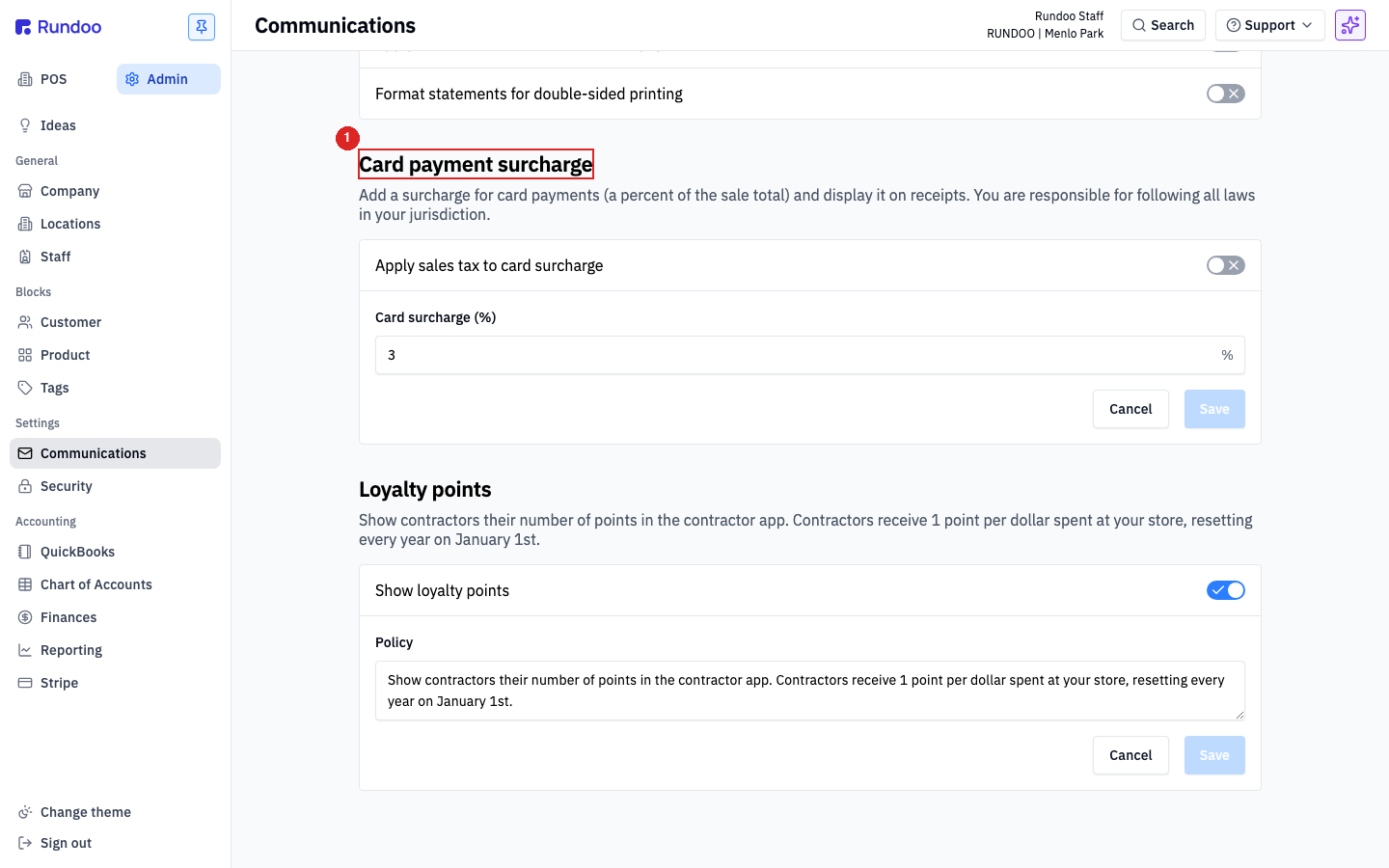
The surcharge is a Company-wide setting (not per-location), and it only applies to the Card tender. Not Gift card, not ACH, not custom clearing tenders. See Tender methods for the full tender catalog.
Card surcharges are not legal in every US state. A handful of states (Connecticut and Massachusetts at last check, with others evolving) prohibit them outright; others require specific signage or cap the percentage. Verify with your jurisdiction and card-network rules before turning this on, you're responsible for compliance, not Rundoo.
Rundoo doesn't offer a cash discount pricing model (where the displayed price is the card price and cash sales get a discount line at the counter). The only customer-passthrough mechanism is the Card surcharge above. In a state where surcharges aren't allowed, the workaround is to leave the rate at 0% and absorb the processing fee. There's no alternative knob that flips the math the other way.
Enabling card surcharges
Surcharges are off by default (the rate input starts at 0, which means no Card fee line ever renders). Turning them on is just setting a non-zero percent.
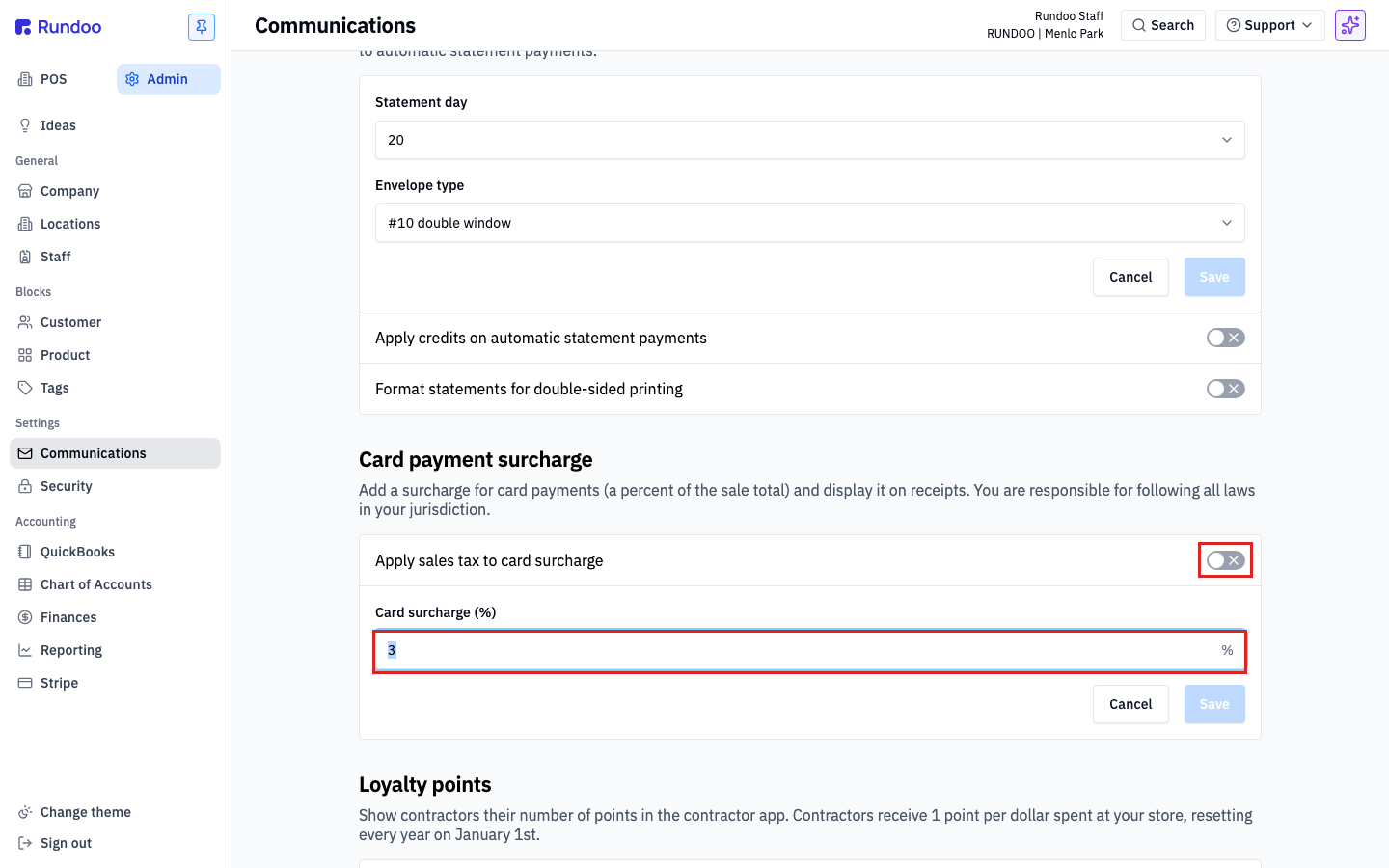
Two controls in the section:
-
Card surcharge (%), the percent Rundoo applies to card sales. Typical values are2or3depending on what your processor charges. The input is capped between 0% and 4%, higher than 4 isn't supported. Decimal rates are allowed, so if your jurisdiction caps surcharges at a fractional percent (Canada, for instance, limits card surcharges to 2.4%), enter2.4and Rundoo applies exactly that. Setting it back to0disables surcharges entirely without having to clear anything else. -
Apply sales tax to card surcharge(a toggle that decides whether the surcharge itself gets taxed). Off by default (the surcharge is a fee, not a taxable sale of goods), but some jurisdictions require it on. This is a manual choice, Rundoo will not turn it on for you. The automatic sales tax that Rundoo calculates from a customer's address figures the rate on the goods you sell, but it does not know whether your state or locality taxes card fees, so it never sets this toggle by itself. If your jurisdiction requires tax on card fees, you have to switch this on. Check with your accountant or tax authority before flipping it.
Click Save when you're done. Changes take effect on the next sale. In-flight carts keep their current calculation.
The rate is one company-wide number, not set per transaction. You can't type a different surcharge percent into an individual sale. The only per-sale lever at the counter is the checkbox that waives the fee entirely (see below), there's no per-transaction rate override. So to charge, say, 2.4% instead of 3% on every card sale, change this Card surcharge (%) field once here and it applies everywhere.
How the surcharge appears at POS
Once a non-zero rate is set, every cart shows a Card fee (N%) line in the totals stack at the bottom-right of the Transaction-builder, between Sales tax and Sale total.
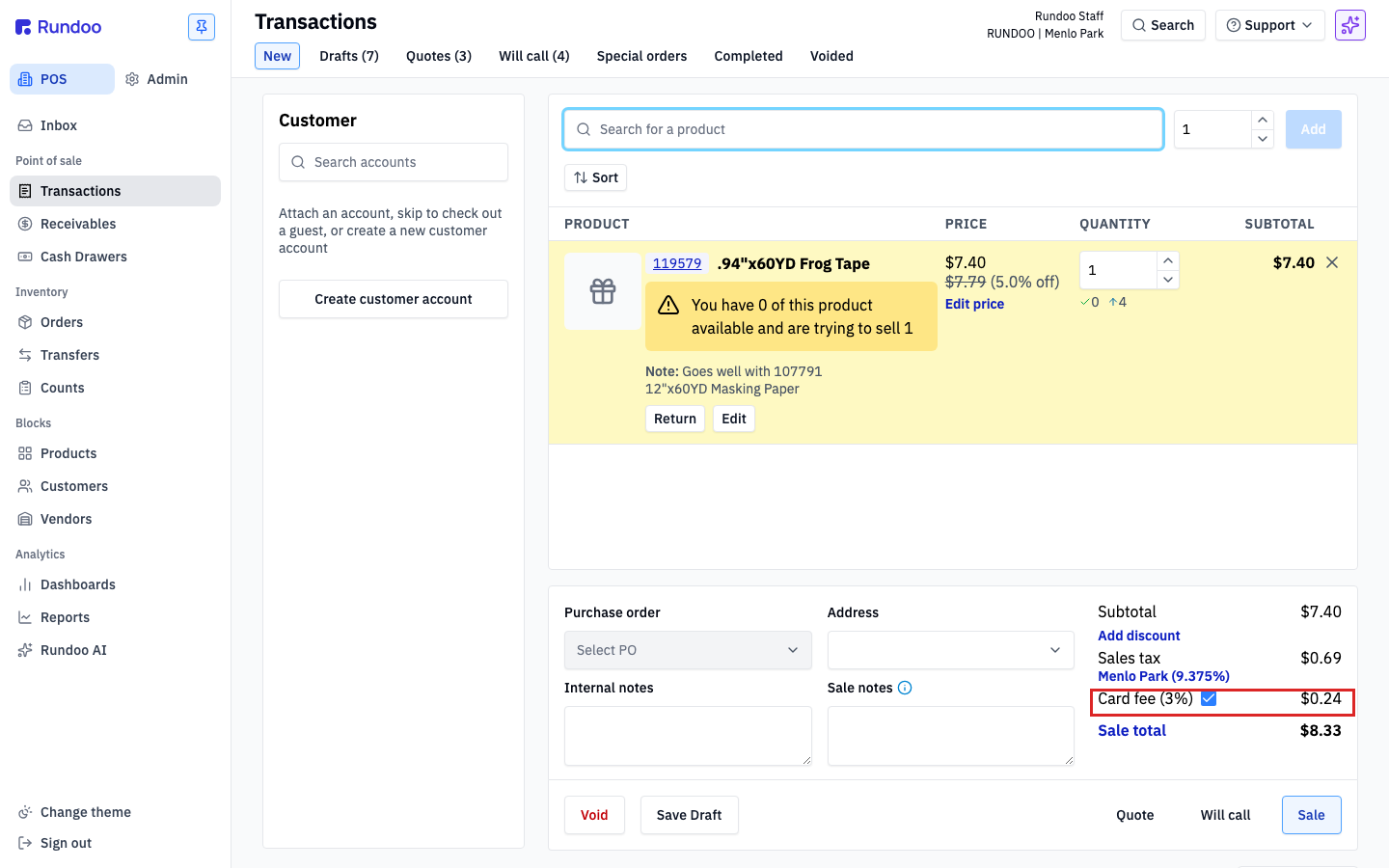
A few things worth knowing about how this feels at the counter:
-
The checkbox next to
Card fee (N%)is a per-sale override. It's checked by default whenever the cart will likely settle onCard. A cashier can uncheck it to waive the surcharge for a specific sale (say, a debit-card sale where you don't want to charge the fee, a customer who complained, or a trade partner getting a courtesy). Unchecking updates theSale totalimmediately. This per-sale toggle is your lever for jurisdictions that restrict surcharges on specific tender types, or for the occasional one-off courtesy. For customers who should always be exempt, use the per-customer toggle, see Always exempting a specific customer below. -
The line prints on the customer receipt as its own entry under tax and above the total. So the customer sees exactly what they paid and why. This is the disclosure most state laws require.
-
Cash, check, and charge-account sales don't see it. If the cart never settles on a card, no fee gets applied. Paying a split sale partly with
Cardwill surcharge only the card-tendered portion (see Sales on split payments for the mechanics). -
Returns don't retroactively refund the surcharge unless you refund the original sale in full. Partial returns against a surcharged sale refund the line subtotals and pro-rated tax; the original card fee stays with the original sale.
Card fee vs card surcharge
Two related concepts that get conflated. They're different numbers.
-
Card fee is what Stripe charges you to process a card. It's deducted from your Stripe payout before the money lands in your bank, and the rate is set by your Stripe contract (not editable in Rundoo). Visible on the Company tab as a read-only field. See Company details. This is Rundoo's cost to you for taking card payments, and you pay it whether or not you pass anything through to your customer.
-
Card surcharge is the percent you charge the customer on card-tendered sales to offset the card fee. This is the knob on Admin > Communications covered on this page. Turning it on doesn't reduce your card fee. It adds a line to the customer's sale to recover some of it.
Because the card fee is calculated on the post-surcharge total (not just the product subtotal), adding a surcharge at the same rate as your card fee doesn't fully cancel it out. Trying to chase the fee with a matching surcharge creates a small residual on every sale. Most stores just set a surcharge that lands near the typical fee and accept the rounding.
Always exempting a specific customer
The per-sale checkbox in the cart is the right tool for one-off overrides, but if a particular customer should never be surcharged, a trade partner on a long-term agreement, a wholesale account, a staff discount customer, toggle the exemption on their customer record so you don't have to remember at the counter.
Open the customer from the POS Customers left tab, head to the customer's settings, and flip Exempt from card surcharge by default on. From then on, every sale attached to that customer opens with the Card fee checkbox pre-unchecked, and the Sale total excludes the surcharge automatically. Cashiers can still re-check it per sale if needed; the setting controls the default, not a hard block.
This is the right answer when a customer calls in asking to stop being charged the card fee. Set the exemption once on their account rather than relying on cashiers to remember to uncheck the box every time.
Taxes on the surcharge
The Apply sales tax to card surcharge toggle is where it gets subtle: the surcharge is a fee, not a sale of goods, so most jurisdictions don't tax it, but some do.
Rundoo does not decide this for you. The automatic tax engine reads a customer's address to set the rate on the goods on the sale, but it has no way to know whether your jurisdiction taxes card fees, so it never flips this toggle on its own. Whether card fees are taxable where you operate is a call you make with your accountant or tax authority, then set here by hand.
When it's on, Rundoo taxes the surcharge line alongside the subtotal, which changes the math at the bottom of the sale in a way that can look wrong at first glance. The Card fee (N%) line on the receipt shows the post-tax amount, and the Sales tax line shows tax on both the subtotal and the pre-tax surcharge combined. If the pre-tax surcharge appears smaller than N% of the sale total, that's because Rundoo's backing it out of the post-tax figure. Check with your accountant before flipping this on, the math is correct, but the receipt format is the kind of thing customers call you about.
Returns and card surcharges
On a full return of a surcharged sale, the surcharge comes back to the customer with everything else. They're made whole. On a partial return, Rundoo refunds the line subtotals and a pro-rated share of tax, but the original Card fee line stays attached to the original sale; the partial return doesn't claw back a slice of it. Good to know for contractor returns and exchange flows. See Returns and Exchanges for the return mechanics.
Recommended Rundocs
-
Tender methods (the full tender catalog and where
Cardfits alongsideCash,Check,Charge account, and custom methods). -
Sales, the end-to-end sale flow, including how the
Card feeline renders in the totals stack and on the receipt.