
Rundocs › Integrations
Benjamin Moore orders
Last updated 2026-08-27
For any questions about this, please email rsos@benjaminmoore.com and support@rundoo.ai
Benjamin Moore orders are purchase orders you send to Benjamin Moore from Rundoo. Depending on how your store is set up, they reach BM one of two ways: by email (the default, and how most BM stores order today) or over Rundoo's EDI integration (turned on by Benjamin Moore for stores that qualify). Either way, Rundoo carries BM's product catalog so you're not keying products by hand, and qualifying sales are reported back to BM for its rebate programs (see Rebate programs on BM sales below).
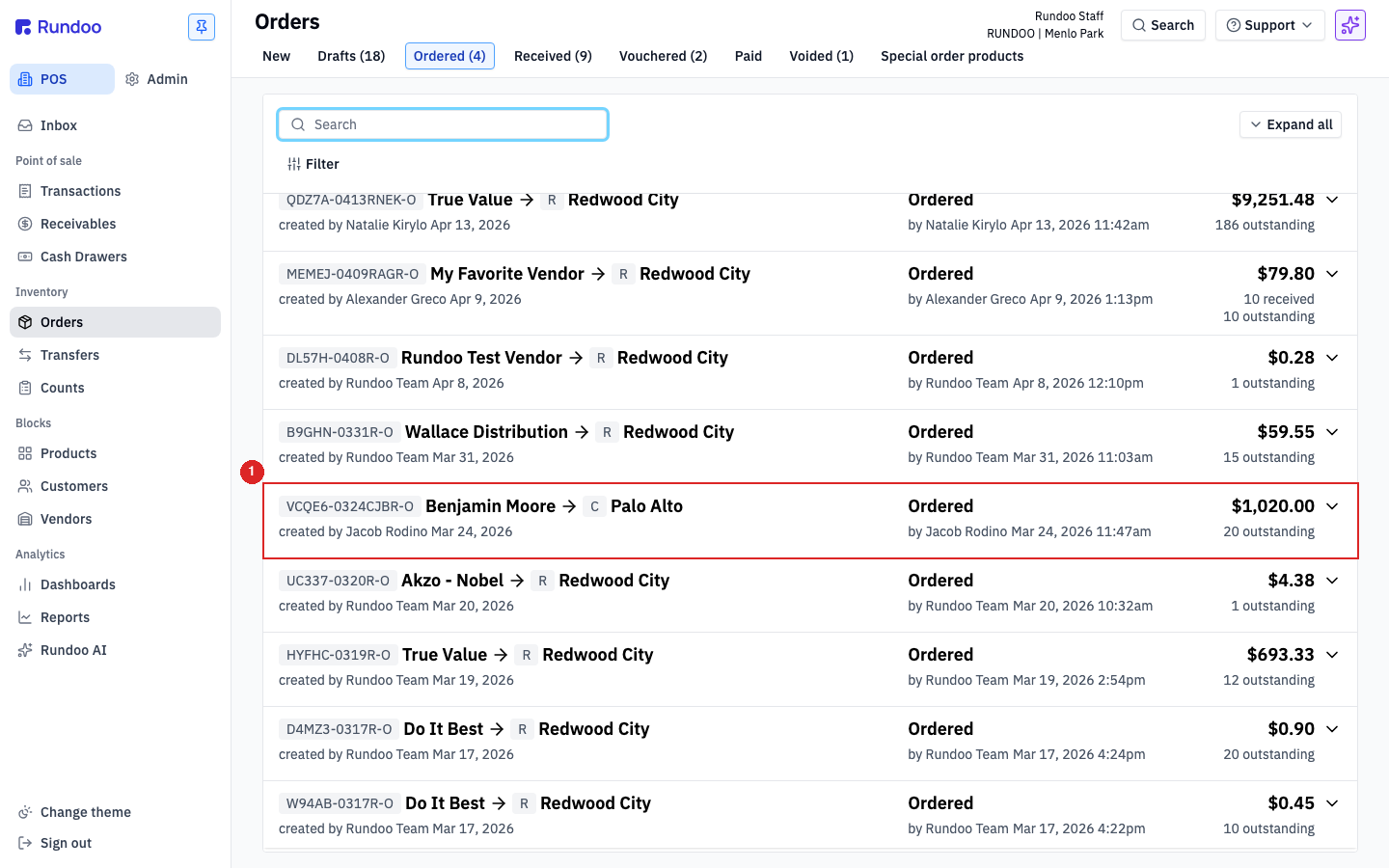
In the POS mode, open the Orders left tab. BM orders live alongside every other PO on the Ordered top tab, recognizable by the Benjamin Moore vendor and the B badge that Rundoo attaches to any BM-integrated record.
What's different about Benjamin Moore orders
On paper, a BM order is still a purchase order. It moves through New → Drafts → Ordered → Received → Vouchered → Paid just like every other PO (see Purchase orders for the lifecycle). Under the hood, a few things are BM-specific:
-
Two ways to send a BM order: email or EDI. How your click on Order reaches Benjamin Moore depends on how your store is set up. Most BM stores today send orders by email, the same way any other vendor order goes out, and it works well. Stores that Benjamin Moore has set up for EDI send orders straight through Rundoo's integration instead, no PDF and no email step. On EDI, what crosses the wire is a short reference code (the
VCQE6-0324CJBR-Ostyle ID in the order header), and BM looks up the full PO from it. Not sure which one you're on? Ask your Benjamin Moore rep or Rundoo Support. See Email vs EDI ordering below. -
BM's catalog drives BM product records. BM products in Rundoo carry BM's SKUs (like
424444for a U66202-018 Microfiber Roller, or004600-001for FS Hi Hiding Primer). The BM catalog Rundoo carries stays current with Benjamin Moore, so you're not typing in SKUs, descriptions, or costs by hand. When BM raises their costs, your existing BM products keep their current cost until you apply the update, so a price change never surprises you at the register. See Benjamin Moore for the couple-of-clicks way to apply BM cost changes to your products. BM products differ from product to product (some are tintable bases, some are sundries, some are equipment), so the fields Rundoo tracks adjust per item rather than being uniform across the BM catalog. The Benjamin Moore vendor is paired to the integration by Rundoo Support at setup, it isn't something you wire up yourself. -
Paint Care Fees aren't Benjamin Moore specific. Rundoo doesn't compute state Paint Care Fees automatically, for BM or any vendor. Set them up once as Additional fees (that page has the per-state PaintCare schedule) and attach them to the products that need them. From there they flow onto BM POs, sales, and statements like any other per-product fee.
-
Rebate reporting is automatic. Qualifying BM sales are reported back to Benjamin Moore's rebate programs from your sales data. That's set up separately from the order, not on the PO. See Rebate programs on BM sales below.
-
The
Bbadge. Rundoo surfaces aBpill on BM-tied records where it fits (the Orders list, theShip tolocation picker, product lines paired to BM). Coverage varies by product (not every BM item carries the badge) so treat it as a hint the record is running through the integration rather than a guarantee.
Email vs EDI ordering
Every Benjamin Moore store can order by email, and it works well. EDI is an upgrade Benjamin Moore turns on for stores that qualify. A few things worth knowing before you ask to move onto it:
-
Getting on EDI starts with Benjamin Moore, not Rundoo. Talk to your BM rep. Benjamin Moore vets and approves stores for EDI on their side first; once they give the go-ahead, Rundoo pairs your vendor record. It isn't a switch you flip yourself in Rundoo.
-
Job quote orders can't go over EDI yet. If you place job-quote orders, those still go by email even after you're set up for EDI, so you'd send your replenishment orders over EDI and email the job-quote ones. If job quotes are most of your ordering, EDI may not be the right fit yet.
-
The biggest EDI win is on receiving, not sending. Sending an order by email is already quick. The real benefit of EDI shows up when the order comes in: Benjamin Moore's electronic invoice reconciles the receiving for you, so you're not hand-adjusting cost and quantity line by line. That's the main reason to move a store onto EDI.
Not sure whether your store is ordering by email or over EDI? Your Benjamin Moore rep can tell you where your store sits, and Rundoo Support can confirm how your BM vendor is paired in Rundoo. A lot of stores assume they're on EDI when they're actually emailing, so it's worth checking.
Placing a BM order
Start from the New top tab like any other PO. Click the Order from dropdown on the left panel and pick Benjamin Moore (the builder locks in BM-specific behavior from that point on).
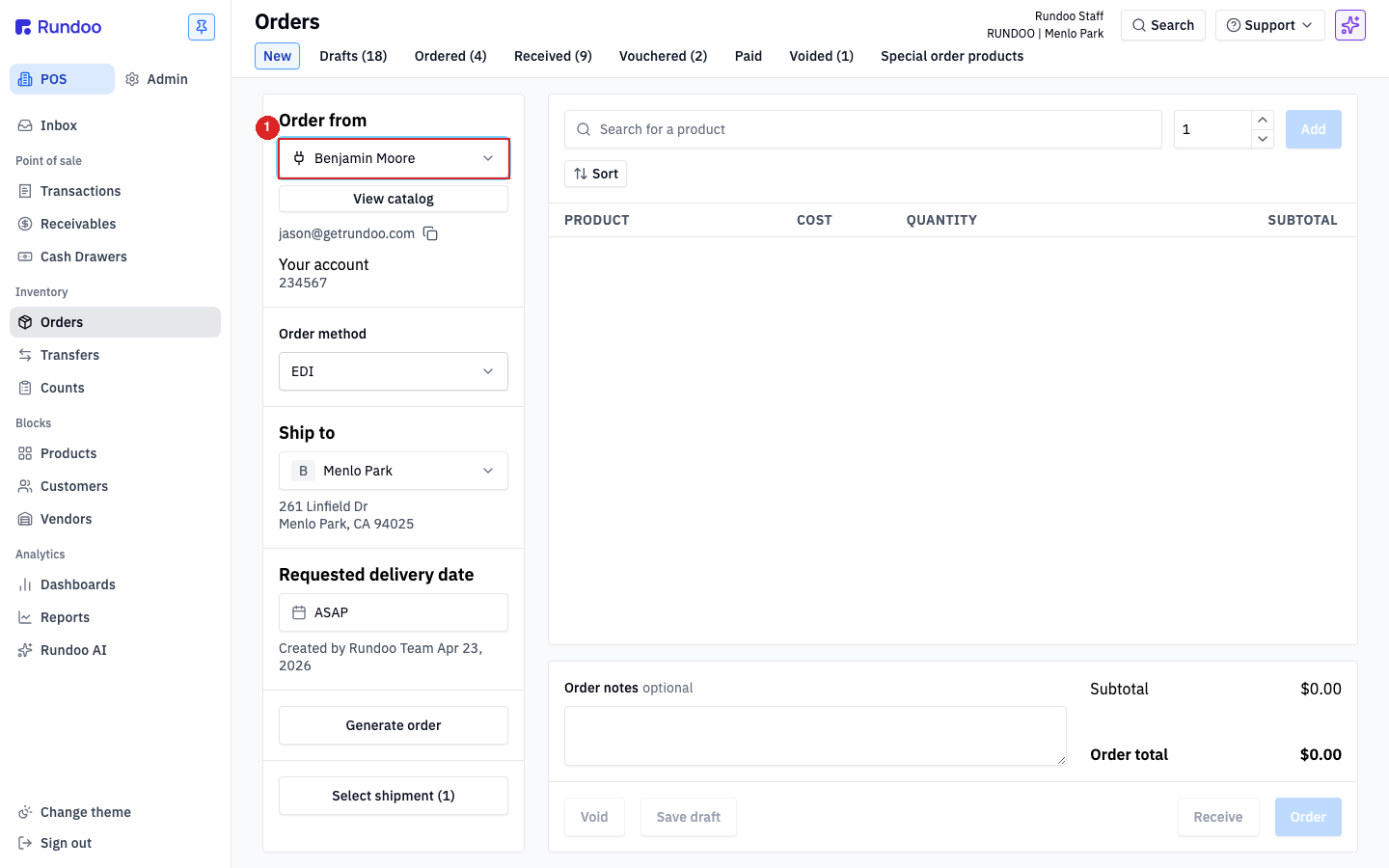
Once BM is picked, add products the same way as a regular PO (click the product search, type a name or BM SKU, pick from the results, set quantity, Add). BM products show up with a B next to the product name or a BM-branded thumbnail for paint SKUs. The standard fields (Cost, Quantity, Subtotal, edit, add note) all behave as described in Purchase orders.
How the order goes out follows your store's setup. If you're on EDI, clicking Order submits the PO straight through the integration, so you don't pick Email or Print. If you're not on EDI, a BM order is sent the same way as any other vendor order (see Purchase orders for order methods). Either way, clicking Order moves the PO into the Ordered tab.
If Benjamin Moore doesn't appear in the vendor dropdown, the BM vendor record isn't paired to the integration yet. That pairing is set up by Rundoo Support, it isn't a step you do yourself. Email support@rundoo.ai or call (650) 334-3205 and we'll get Benjamin Moore connected for you.
Receiving a BM order
When BM's truck shows up, open the PO from the Ordered tab and receive it the same way as any other PO, but with a few BM-specific fields and totals visible.
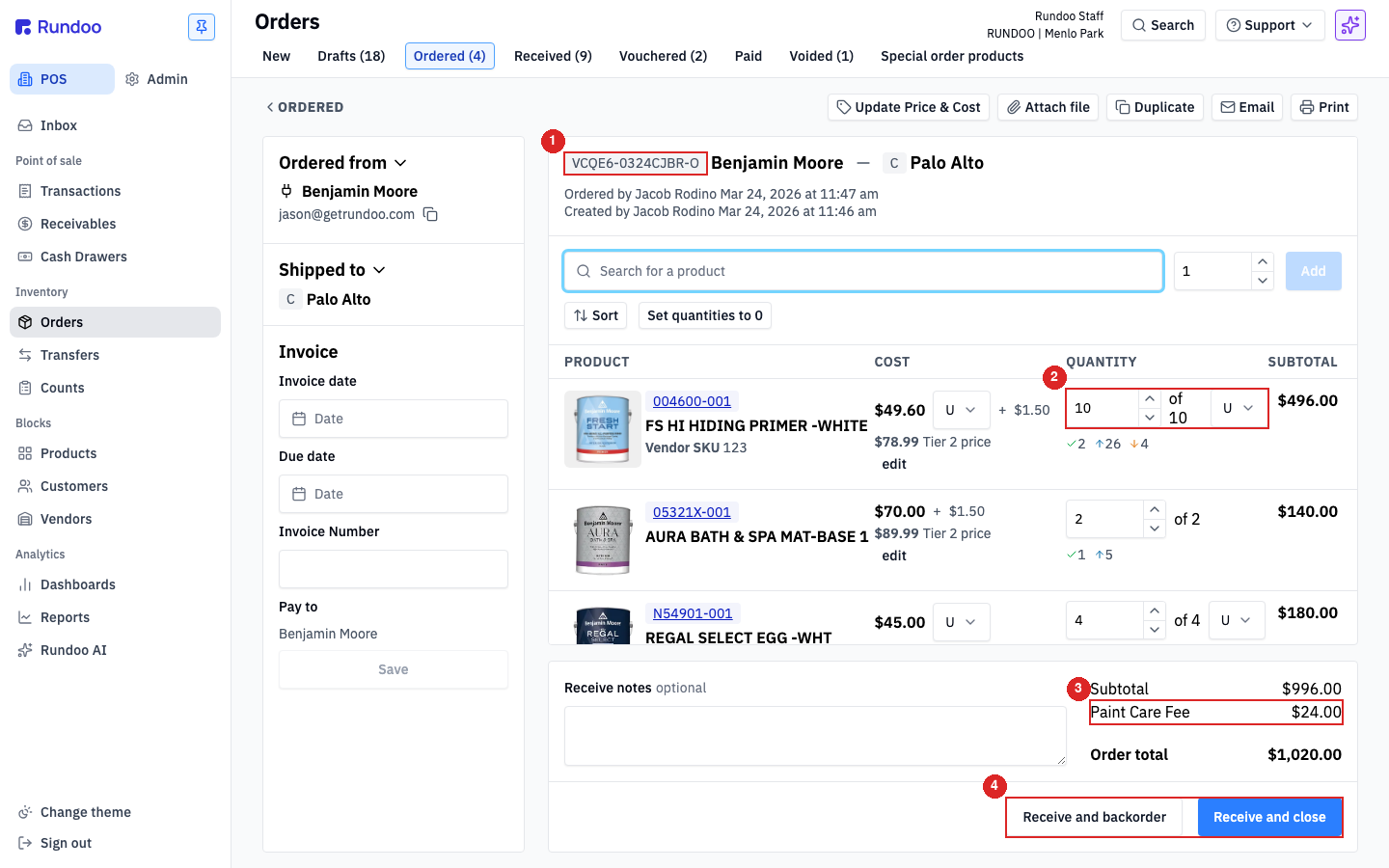
The detail view for a BM order shows:
-
The BM order reference at the top, next to the
Benjamin Moorevendor (theVCQE6-0324CJBR-O-style code ties this PO to the corresponding record on BM's side). Keep it around if you need to call BM about a short-ship or invoice discrepancy. -
Per-line received-quantity editing. Each product line has an
of Nfield next to the quantity stepper (what arrived vs what was ordered). Under-received lines show a red↓indicator; over-received lines show↑. Edit each line to match what actually showed up. -
Paint Care Fee lines, if you configured them. Any Paint Care Fee owed comes from the Additional fees you attached to the BM products on the PO. Rundoo doesn't compute or inject it from BM's side.
-
Receive and close / Receive and backorder. Same two paths as any PO: close the order if the shipment is complete (or you're sourcing the shortage elsewhere), or backorder if BM owes you more and you want to keep the rest on the PO. See Purchase orders for the detailed comparison.
Once received, log the invoice under Invoice date, Due date, Invoice Number, and Pay to, then Voucher moves the PO into Vouchered. If BM's invoice doesn't match what arrived (wrong cost, missing rebate, credit owed) record the adjustment through Order receipts.
Rebate programs on BM sales
Qualifying Benjamin Moore sales can be reported to BM's rebate programs automatically. That's configured once in the Benjamin Moore offers section (Admin mode, Company left tab), separately from any order, so there's nothing to do per PO. The setup, cadence, and troubleshooting each have their own page:
-
CCP & RSD, the two Benjamin Moore sales-reporting feeds and how to turn them on in Rundoo.
-
Contractor Rewards, the bonus code, PAX IDs, and per-customer forwarding controls.
Recommended Rundocs
-
Purchase orders, the generic PO lifecycle and builder, same shape as BM orders.
-
Vendors, how vendor records work in Rundoo (the Benjamin Moore pairing itself is handled by Rundoo Support).
-
Order receipts (recording adjustments when a BM invoice doesn't match what arrived).