
Rundocs › Analytics
Running Reports
Last updated 2026-08-25
Where every default report in Rundoo lives, what each one is for, and how to find it.
How to use this page: scan the category that matches your question ("I want to see AR balances" → AR & aging; "How much tax by location?" → Taxes). Each report's one-line description tells you if it fits. Open it in Rundoo for exact columns, filters, and totals.
Where to find Rundoo reports
If you don't see Reports in the sidebar, it's usually a permission issue (ask your management team to check your staff role).
To open Reports: POS mode → Analytics group in the sidebar → Reports.
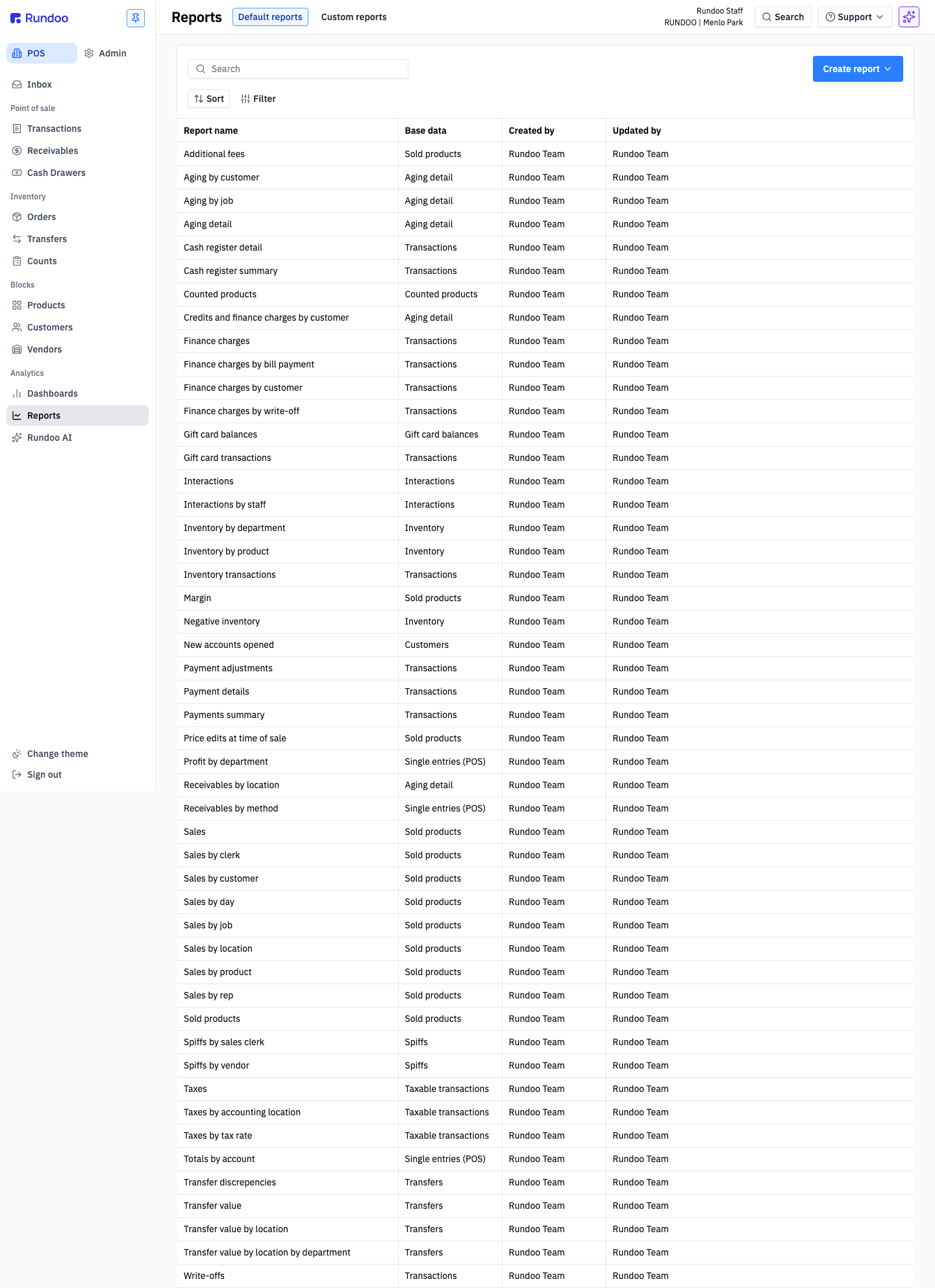
Every row on the Reports page has a Base data column. That's the dataset the report pulls from (Sold products, Transactions, Aging detail, etc.). Reports sharing the same Base data share filters and row semantics, so if one doesn't quite answer your question, try its siblings.
Sales & margin
Performance reports pulled from sold-products data.
-
Sales · Base data: Sold products · All sold products across the business for the period.
-
Sales by clerk · Base data: Sold products · Sold products grouped by the clerk on the transaction.
-
Sales by customer · Base data: Sold products · Sold products grouped by customer.
-
Sales by day · Base data: Sold products · Daily sales totals (trend view).
-
Sales by job · Base data: Sold products · Sold products grouped by job.
-
Sales by location · Base data: Sold products · Sold products grouped by store location.
-
Sales by method · Base data: Sold products · Sold products grouped by tender method (card / cash / on-account / etc.).
-
Sales by rep · Base data: Sold products · Sold products grouped by assigned sales rep.
-
Sold products · Base data: Sold products · Row-per-line-item view of every product sold.
-
Margin · Base data: Sold products · Revenue vs. COGS at the line-item level (profitability by product).
-
Negative inventory · Base data: Sold products · Line items where a sale drove on-hand count below zero.
-
Additional fees · Base data: Sold products · Additional fees applied at the line-item level.
Accounts Receivable & aging
Who owes what, and how overdue. Use before statement runs and credit review.
-
Aging by customer · Base data: Aging detail · AR balances rolled up by customer with 0/30/60/60+ buckets.
-
Aging by job · Base data: Aging detail · AR balances rolled up by job.
-
Aging detail · Base data: Aging detail · Full detail of AR balances with aging buckets, for credit management.
-
Credits and finance charges by customer · Base data: Aging detail · Credits issued and finance charges applied, grouped by customer.
-
Receivables by location · Base data: Aging detail · AR balances grouped by store location.
Payments & cash
Money in, how it came in, and drawer reconciliation.
-
Payments · Base data: Transactions · Every bill-payment transaction.
-
Payments by location · Base data: Transactions · Bill payments grouped by store location.
-
Payments summary · Base data: Transactions · Totals view of payments.
-
Payment adjustments · Base data: Transactions · Adjustments (voids, reapplications) made to prior payments.
-
Receivables by method · Base data: Single entries (POS) · Outstanding receivables grouped by tender method.
-
Cash register detail · Base data: Transactions · Every cash drawer transaction, row-by-row (for drawer reconciliation).
-
Cash register summary · Base data: Transactions · Totals per register per shift (for end-of-day closeout).
-
Price edits at time of sale · Base data: Transactions · Any line where the clerk adjusted price away from the default. This is your discounts-applied-to-sales report. A discount rung at the register is recorded as a price edit, so this is where point-of-sale discounts show up. Don't confuse it with the Receivables early-payment discount ("Sale early payment discount adjustment"), which lives on statements and is a separate thing from a line-level sale discount.
Finance charges
Interest and late fees on overdue accounts.
-
Finance charges · Base data: Transactions · All finance charges applied across the business.
-
Finance charges by bill payment · Base data: Transactions · Finance charges grouped by the bill payment that paid them off.
-
Finance charges by customer · Base data: Transactions · Finance charges grouped by customer (collections view).
-
Finance charges by write-off · Base data: Transactions · Finance charges that were written off (bad-debt view).
Gift cards
-
Gift card balances · Base data: Gift card balances · Every active gift card and its remaining balance (liability tracking).
-
Gift card transactions · Base data: Transactions · Gift card issues, redemptions, and adjustments.
Inventory
-
Inventory by department · Base data: Inventory · Total on-hand value rolled up by department.
-
Inventory by product · Base data: Inventory · On-hand value at the SKU level.
-
Inventory transactions · Base data: Transactions · Every inventory-affecting transaction (sales, orders, transfers, counts).
-
Counted products · Base data: Counted products · Products touched during an inventory count (variance review).
Transfers
Stock movement between locations.
-
Transfer discrepancies · Base data: Transfers · Transfers received with a mismatch between sent and received quantity or value.
-
Transfer value · Base data: Transfers · Value of stock transferred between locations.
-
Transfer value by location · Base data: Transfers · Transfer value grouped by receiving location.
-
Transfer value by department by location · Base data: Transfers · Transfer value grouped by department, then receiving location.
Taxes
When you need to see how much sales tax you've collected, whether to file and pay it or to pull an end-of-month sales tax summary, run the Taxes report. It totals the sales tax collected for the period you pick, and its siblings break that same number down by location or GL account so it ties out to what you owe each jurisdiction.
-
Taxes · Base data: Taxable transactions · All sales tax collected by tax rate. This is the sales-tax-collected report to run when you file and pay: pick your filing period and it shows the tax you collected, grouped by rate.
-
Taxes by accounting location · Base data: Taxable transactions · Tax collected grouped by accounting location.
-
Taxes by location · Base data: Taxable transactions · Tax collected grouped by store location (use this when each store files with its own jurisdiction).
-
Taxes by tax account · Base data: Single entries (POS) · Tax collected grouped by GL tax account.
Filing and paying sales tax. Run Taxes for the filing period (a month, a quarter) and read the collected total, or Taxes by location if each store files with its own jurisdiction. Rundoo reports what you collected; carry that number into your state's filing. If a total-sales figure elsewhere (a dashboard, a Sales report) doesn't match the Taxes report, that's expected: the Taxes report counts taxable transactions only, so tax-exempt and non-taxable sales aren't in it.
People & interactions
-
Interactions · Base data: Interactions · Logged customer interactions (calls, notes, follow-ups).
-
Interactions by staff · Base data: Interactions · Interactions grouped by the staff member who logged them.
-
Spiffs by sales clerk · Base data: Spiffs · Spiff payouts grouped by clerk.
-
Spiffs by vendor · Base data: Spiffs · Spiff payouts grouped by vendor program.
-
New accounts opened · Base data: Customers · New customer accounts created in the period.
Profitability
- Profit by department · Base data: Single entries (POS) · Gross profit rolled up by department.
Write-offs
- Write-offs · Base data: Transactions · Balances written off (bad-debt accounting).
Can't find a report you need? Post on the Idea board or reach out to Rundoo Support.
Recommended Rundocs
-
Dashboards (pre-built visual summaries across the same datasets).
-
Custom reports, build your own when a default report doesn't fit.
-
Dooey. Ask questions about your store's data in plain English.
-
Idea board, for requesting new reports.