
Rundocs › Accounts Receivable
Finance terms
Last updated 2026-07-27
Finance terms are the payment rules Rundoo uses to decide how a customer pays (today at the counter, or later on a statement or per-invoice balance). Every customer is assigned one, and the term's shape determines whether the customer is a retail walk-in or a charge-account contractor.
In the Admin mode, open Customer in the left sidebar (the Finance terms section sits just below Pricing tiers).
How finance terms work
A finance term is two things bundled together: a reference date (when the clock starts) and a net due days number (how many days after the reference date the balance is due). Rundoo ships with 14 terms in the demo tenant (Cash, Net 30 Statement, Net 1 Statement, Net 1 Invoice, Net 7 Invoice, 5/18 Net 30 EOM, 1/10 Net 30 EOM, Net 31 Invoice, Discounted for LW, Early Payment, CLB terms, Net 60 Invoice, 2% 30, Net 60) and you can add more.
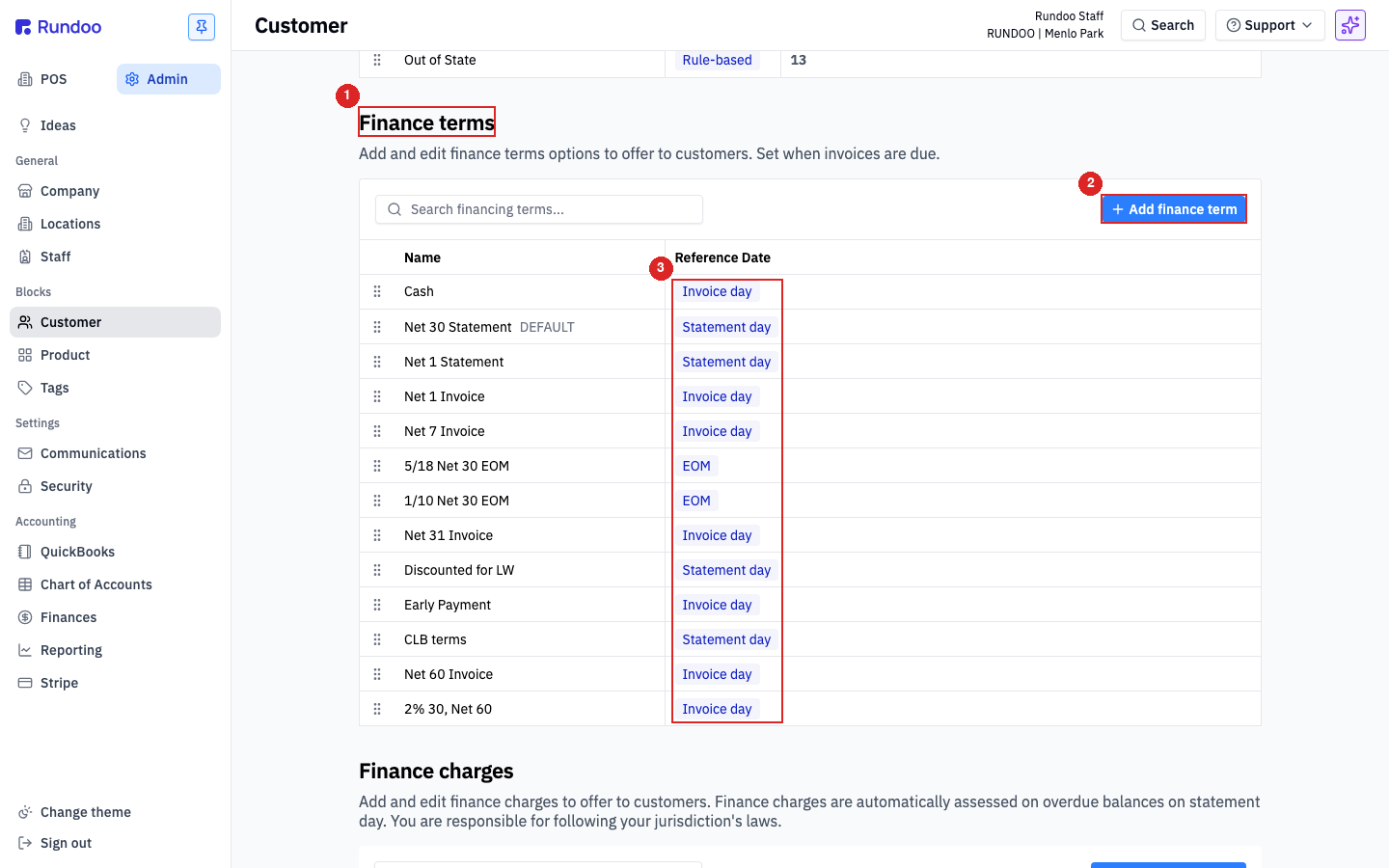
Reference date is the knob that matters most. It controls whether the customer is retail, a statement-based charge account, or an on-account invoice customer:
-
Invoice day, the due-date clock starts the moment each sale rings up. Each invoice has its own due date.
Net 7 Invoicemeans "pay each invoice within 7 days of the sale." -
Statement day. Invoices roll up into a monthly statement, and the clock starts from the statement date.
Net 30 Statementmeans "pay the month's total 30 days after the statement goes out." This is what turns a customer into a charge account. -
EOM (end of month). The clock starts on the last day of the month in which the invoice landed.
5/18 Net 30 EOMmeans "5% off if paid by the 18th; otherwise the net is due 30 days from end of month." -
Statement EOM (end of statement month). The clock starts on the last day of the statement period the invoice landed in, not the last day of the calendar month. Use this for charge-account customers whose statement day isn't the end of the month (every invoice on the same statement ends up with the same due date, so the customer pays one consistent date month to month instead of a calendar-month bunching).
One term is marked DEFAULT (typically Net 30 Statement in the demo). New customers don't inherit it silently (the Finance term field on a customer's Settings is required at creation time), but it's a useful anchor for the most common customer shape in your store.
Finance term is what makes a customer a charge account, there's no separate toggle. If an on-account tender doesn't show up at POS for a customer you thought had a tab, check this field first. See Customers for the retail-vs-charge-account framing.
Statement vs Invoice terms
The split between Statement and Invoice reference dates is the biggest decision a term encodes. It changes how and when the customer sees a bill, and which AR workflow their sales flow into.
| Attribute | Statement terms (Net 30 Statement, Net 1 Statement, …) |
Invoice terms (Net 1 Invoice, Net 7 Invoice, Net 60 Invoice, …) |
|---|---|---|
| How the customer is billed | Monthly rollup, all of a month's sales aggregate into one statement. | Per transaction, each sale is its own invoice with its own due date. |
| When the due-date clock starts | On statement date (end of each month's cycle). | On sale date (the moment the transaction rings up). |
| Is this a "charge account"? | Yes, shows up on the monthly Statements run. | Yes in the sense that they buy on account, but no statement is generated, they pay per invoice. |
| Typical customer | Contractor with a running monthly tab (gets one statement at month-end). | Contractor who wants each job tracked as its own bill, or one paid on delivery per transaction. |
| On-account tender at POS? | Yes. | Yes. |
| Receives statements? | Yes (included in the monthly Statements run). | No, the invoice itself is the bill. |
There are also two month-end shapes. EOM (end of month), used by terms like 5/18 Net 30 EOM and 1/10 Net 30 EOM, ties the clock to the last day of the calendar month and is often paired with an early-payment discount; 5/18 Net 30 EOM reads as "5% discount if paid by the 18th of the month following the sale; otherwise net 30 days from end of month." Statement EOM is the newer variant: it ties the clock to the last day of the customer's statement period instead, so customers whose statement day isn't month-end still get one consistent due date for every invoice on the same statement (instead of the calendar-month bunching that plain EOM causes for off-cycle statement days).
Cash is in the list too and is always Invoice day, 0 net days. Customers on Cash pay at the counter every time; on-account tenders never unlock for them. It's the retail default. Setting a customer to Cash only closes off the on-account Charge account tender, it does not stop them paying by credit card, cash, or check. Those tenders are always available at the register no matter the finance term.
Adding a finance term
From the Finance terms section, click + Add finance term in the top-right of the table. The Add finance term modal opens.
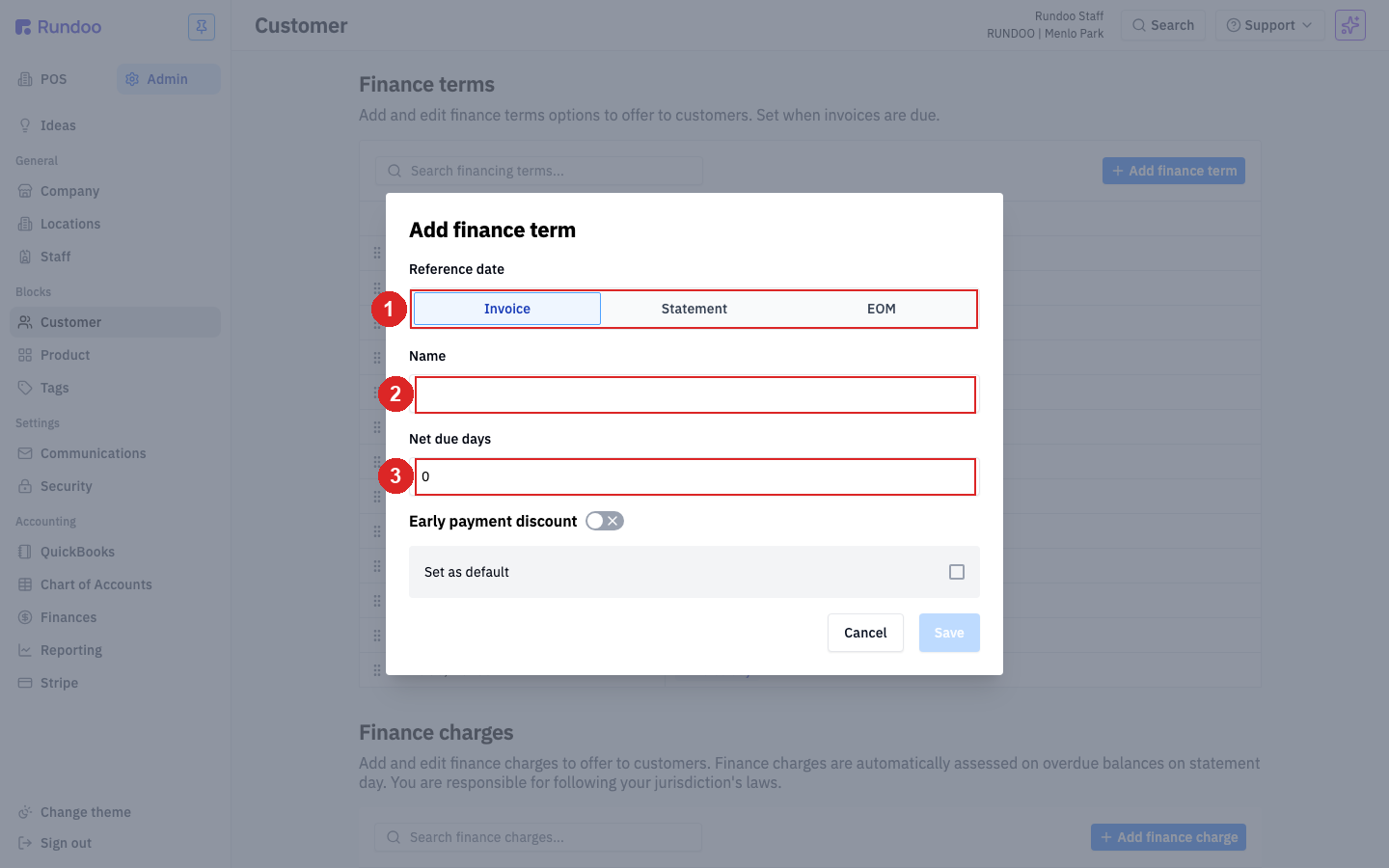
| Field | What it does | Default |
|---|---|---|
| Reference date dropdown | Invoice / Statement / EOM / Statement EOM (the four shapes above). Pick Statement for a charge-account term, Invoice for per-transaction terms, EOM when the due date ties to the calendar month-end, Statement EOM when it ties to the customer's statement-period end. | Invoice |
Name |
What this term shows up as (in the Finance term dropdown on customer Settings, on statements, on invoices). Make it recognizable (Net 30 Statement, not just Net 30). |
. |
Net due days |
How many days after the reference date the balance is due. 30 for most statement terms, 7 for a fast invoice term, 0 for cash-at-counter. |
0 |
Early payment discount toggle |
On/off. Turning it on reveals a Discount percent and a Discount within days field. That's how a term like 5/18 Net 30 EOM gets encoded ("5% off if paid within 18 days"). |
Off |
Set as default |
Makes this the DEFAULT term (new customer creation forms land on it by default). Only one term is default at a time. | Unchecked |
Click Save. The new term appears in the list and becomes available on every customer's Finance term dropdown immediately.
Naming is what stays visible. Net 30 and Net 30 Statement behave identically if both have the same reference date and net days, but only the name tells a cashier which one to pick. Include Statement, Invoice, or EOM in the name when the shape isn't obvious from the number alone.
Editing a term
Click a term's row in the list to open the Edit finance term modal. Same fields as Add finance term, plus a Delete button in the bottom-left.
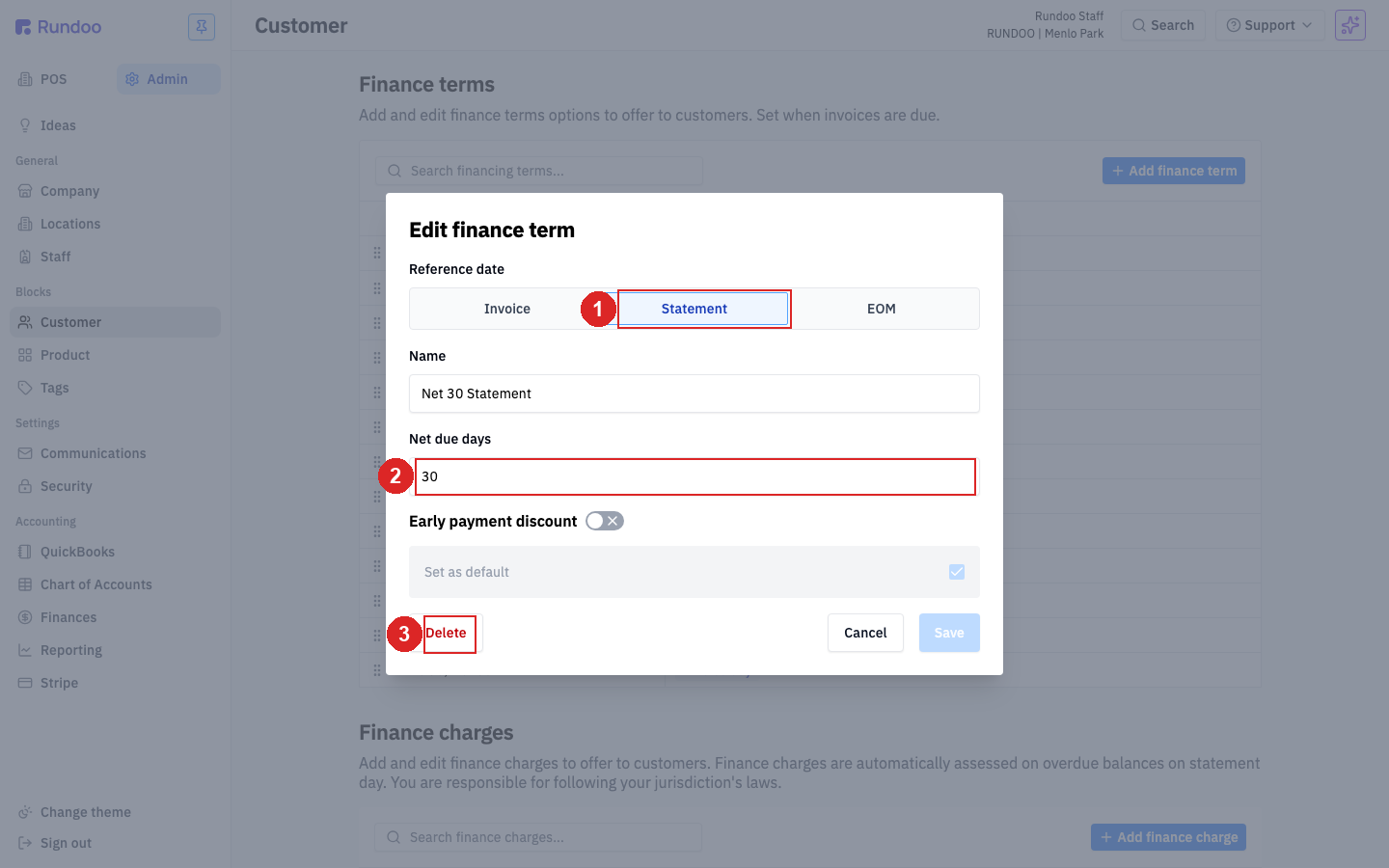
All fields remain editable after creation, including reference date. Changing a term updates the clock for future sales; existing invoices and statements are not recalculated. If you change Net 30 Statement to Net 45 Statement, every customer on that term immediately gets 15 more days on sales rung from that point forward. Past invoices keep their original due dates.
Set as default flips from the previous default automatically. Only one term can be default at a time. If Net 30 Statement is currently default and you check Set as default on a new Net 7 Invoice, the old default quietly becomes non-default. There's no warning.
Delete removes the term from the list and from every customer's Finance term dropdown. Customers currently assigned to the deleted term will need to be reassigned. Rundoo prevents deleting a term in use, so clear customers off first, or reassign them as part of the cleanup.
Turning an early-payment discount on or off
An early-payment discount, a term shaped like 2% 10 Net 30 (2% off if the customer pays within 10 days), rides the finance term, not the individual customer. The Early payment discount toggle in the Add/Edit finance term modal is the only switch for it. There's no per-customer on/off and no "automatic off, manual on" mode.
To take an automatic discount off every customer on a term (for example, "how do I turn off the 2/10 Net 30 discount for all customers"), open the term (click its row in the Finance terms table), turn the Early payment discount toggle off, and click Save. The discount stops applying to every customer assigned to that term, on invoices from that point forward.
The discount is a property of the term, so you can't switch it off for one customer and leave it on for another. If only some of your account customers should get an early-pay discount, put the ones who shouldn't onto a finance term that doesn't have the Early payment discount toggle turned on. This is also the fix when the discount is landing on customers who buy and pay right at the counter: those walk-in-style payers belong on a term without the early-pay discount, since Rundoo applies the term's discount automatically whenever the term has it on, and there's no way to hold it back for manual entry on the ones who don't earn it.
Assigning a term to a customer
Every customer has exactly one finance term. The assignment lives on the customer's detail page, not on the term.
In the POS mode, open Customers in the left sidebar, click the customer's row, then open the Settings tab. Scroll to the Financing section (the Finance term dropdown sits at the top).
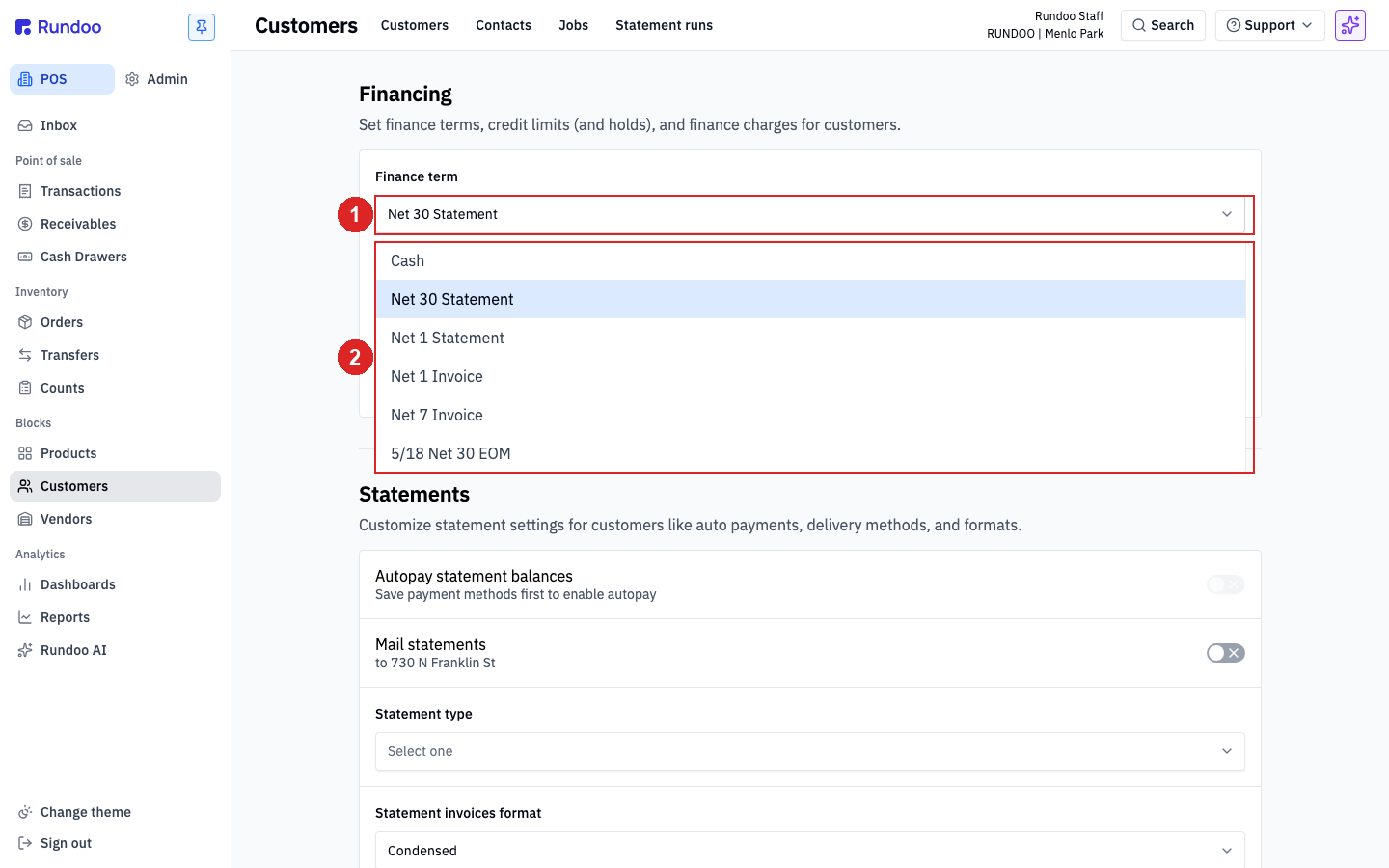
Pick a term from the dropdown. The dropdown lists every term in the system (Cash, every Statement term, every Invoice term, and the EOM variants). Click Save at the bottom of the section to commit.
Three fields in the Financing section work together:
-
Finance term (the one we're discussing). Drives whether on-account tenders unlock at POS and which AR workflow (statements vs per-invoice) this customer flows into.
-
Credit limit. Caps how much they can owe at once. When a sale would push their balance past this, the on-account tender is blocked until they pay some down. See Bill payments for how customers pay down their balance.
-
Finance charge (interest applied to overdue balances). Separate from the finance term itself; see Finance charges for the charge shapes (percent, grace period, compounding).
Changing a term takes effect on the customer's next sale. Past sales keep their original invoices and statements. Switching from Net 30 Statement to Net 60 Invoice doesn't migrate open balances off the statement run, it just changes where new sales land going forward.
Switching from a Statement term to an Invoice term stops generating statements for that customer, but any balance already on an in-flight statement stays there until that statement cycle closes. See Statements for how mid-month term changes interact with the statement run.
Overriding a term on one sale
You can't. Finance terms are a customer-level setting, not a sale-level one. The Sale form has fields for Purchase order, Address, Internal notes, and Sale notes, but no finance-term picker, no per-sale due-date override, and no per-sale net-days input. Picking Charge account as the tender at checkout posts the sale to the customer's account under their existing finance term; the Charge account panel shows only the customer and their credit utilization, with no term controls.
If a contractor asks for longer terms on one job, Rundoo can't do it at the register. The cashier has two imperfect options: (1) flip the customer's finance term before the sale and flip it back after, clean but risky if another cashier rings them up in the gap; (2) put a note like "Net 60 on this job per Nick" in Sale notes so it lands on the invoice as a human record (doesn't change the actual due date). Invoice due dates are not editable after the sale posts, there's no way to extend a single invoice's term retroactively. There's an open customer request for true per-sale term override, if this comes up often in your store, upvote on the Idea Board.
The structural reason is that Statement terms need to know which monthly rollup a sale belongs to, and Invoice terms set the due-date clock from the sale date. Both work from the customer's single assigned term. Mixing terms across sales for one customer would split them across multiple statement cycles or invoice streams, which the AR model doesn't support today.
Recommended Rundocs
-
Customers, where the finance term is actually assigned, and the retail vs. charge-account framing that finance terms sit behind.
-
Statements (what happens monthly for customers on a
Statementterm). -
Bill payments (how charge-account customers pay down their balance).
-
Finance charges, interest assessed on overdue balances; configured alongside finance terms under Admin > Customer.