
Rundocs › POS
Cash drawer
Last updated 2026-09-16
The cash drawer page is where you move cash in and out of the register outside of a sale (petty-cash withdrawals and deposits) and where you close the drawer at end of day and reconcile against what Rundoo expects.
How to use this page: pulling cash out for a quick run? Skip to Step 1: Petty cash. Closing the drawer at end of day? Go to Step 2: Close out. Can't find the Close out option, want a partial closeout, or closed out by mistake and need to fix it? All three are covered under Step 2: Close out. Looking up a past session? See Past drawer sessions at the bottom.
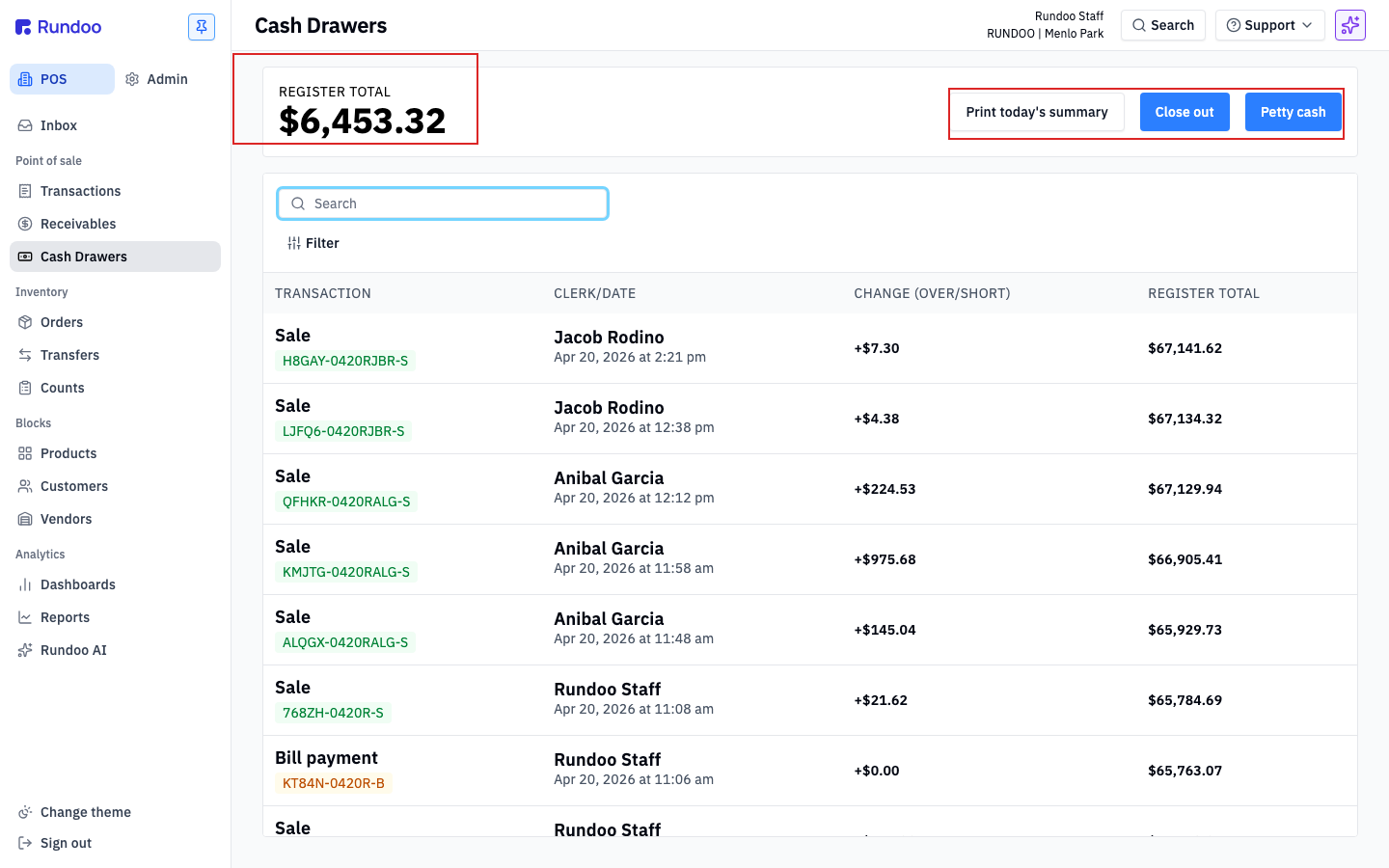
In the POS mode, open the Cash Drawers left tab. The page shows your current REGISTER TOTAL at the top left (the running cash balance Rundoo expects in the drawer right now, based on today's sales, refunds, and petty-cash movements). Three actions sit in the top-right action cluster: Print today's summary, Close out, and Petty cash.
💡 The
REGISTER TOTALstarts each day from your Float, the standard cash you leave in the drawer overnight. Float is configured per location in Locations; ask your management team if yours needs to change.
Step 1: Petty cash (withdraw or deposit)
Petty cash is how cash leaves or enters the drawer without a sale attached, pulling $20 for a lunch run, reimbursing a delivery tip, or dropping in extra starting change. Logging it through Rundoo keeps the drawer in sync so the close-out doesn't show a variance.
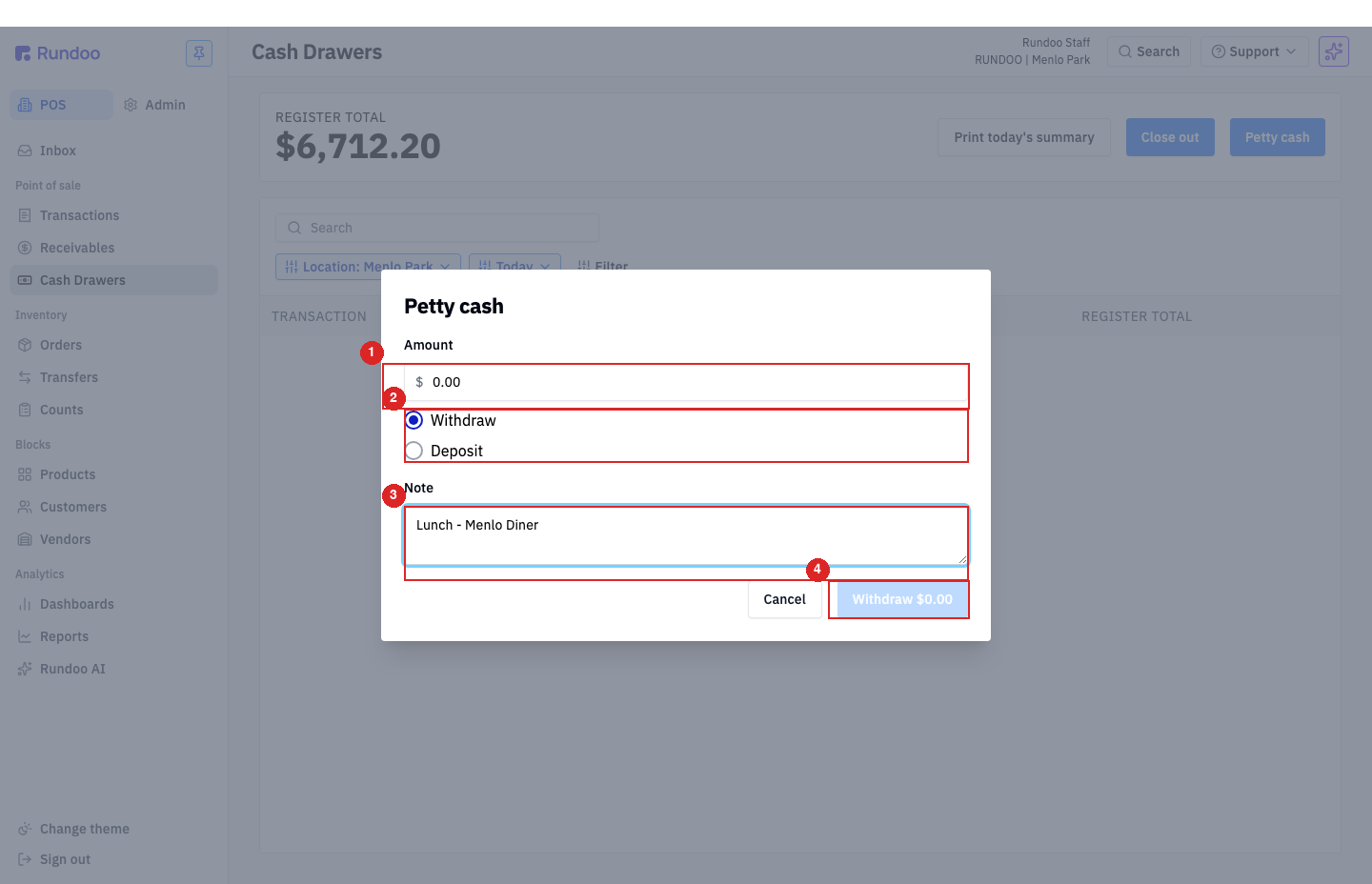
Click Petty cash in the action cluster. In the modal:
-
Amount, the dollar figure moving.
-
Withdraw (default) or Deposit,
Withdrawtakes cash out of the drawer,Depositadds cash in. Rundoo uses this to adjust theREGISTER TOTAL. -
Note (what it was for). This is your audit trail, so be specific (
Lunch — Menlo Diner, notfood). The note shows up later in Past drawer sessions and on the end-of-day summary.
Click the commit button, which mirrors your choice (Withdraw $25.00 or Deposit $100.00), with the amount live in the label.
⚠️ Cash pulled out of the drawer without going through Petty cash will show up as short at close. Rundoo has no way to know about it otherwise. If you forgot to log one earlier in the day, log it before closing out. The
Notefield is there to explain why.
Step 2: Close out (end-of-day count + reconciliation)
Close out is the end-of-day ritual: physically count the drawer, enter what you counted, and let Rundoo tell you whether it matches what it expected. Any mismatch surfaces as Short/over, that's your variance.
Don't see a Close out option? Close out lives in the top-right action cluster of the Cash Drawers left tab (in POS), alongside Print today's summary and Petty cash. It is not inside a sale, order, or will-call ticket, so if you opened a saved order or transaction looking for it, back out to the Cash Drawers tab. If it's still missing there even with full permissions, your location may not have a cash drawer configured yet (see Multiple drawers at one location below), and Close out only runs against the drawer the register is signed in to.
There's no separate "partial closeout." Rundoo has one end-of-day Close out that counts the whole drawer and reconciles it. To take part of the cash out during the day without closing (a mid-day drop to the safe), use Petty cash > Withdraw with a note like Mid-day drop to safe. That lowers the REGISTER TOTAL so your end-of-day close-out still balances.
Close-outs can't be backdated. Every close-out stamps to the moment you click Close out (there's no date picker on the modal, and past sessions in the table are read-only). If you missed an end-of-day count and the drawer's been open across multiple days, don't try to retroactively close yesterday: use Recovering from a long-uncounted drawer below to absorb the drift into today's session with a note.
Closed out by mistake? You can't undo it yourself. Past close-outs are read-only, there's no reverse or delete button on a session in Past drawer sessions, and you can't re-close the same period. If a cashier ran an erroneous close-out, or closed twice on the same day, email Rundoo Support with the location, the date, and which session was wrong so they can reverse it. Keep counting and closing normally in the meantime, the bad session stays in the log until Support removes it.
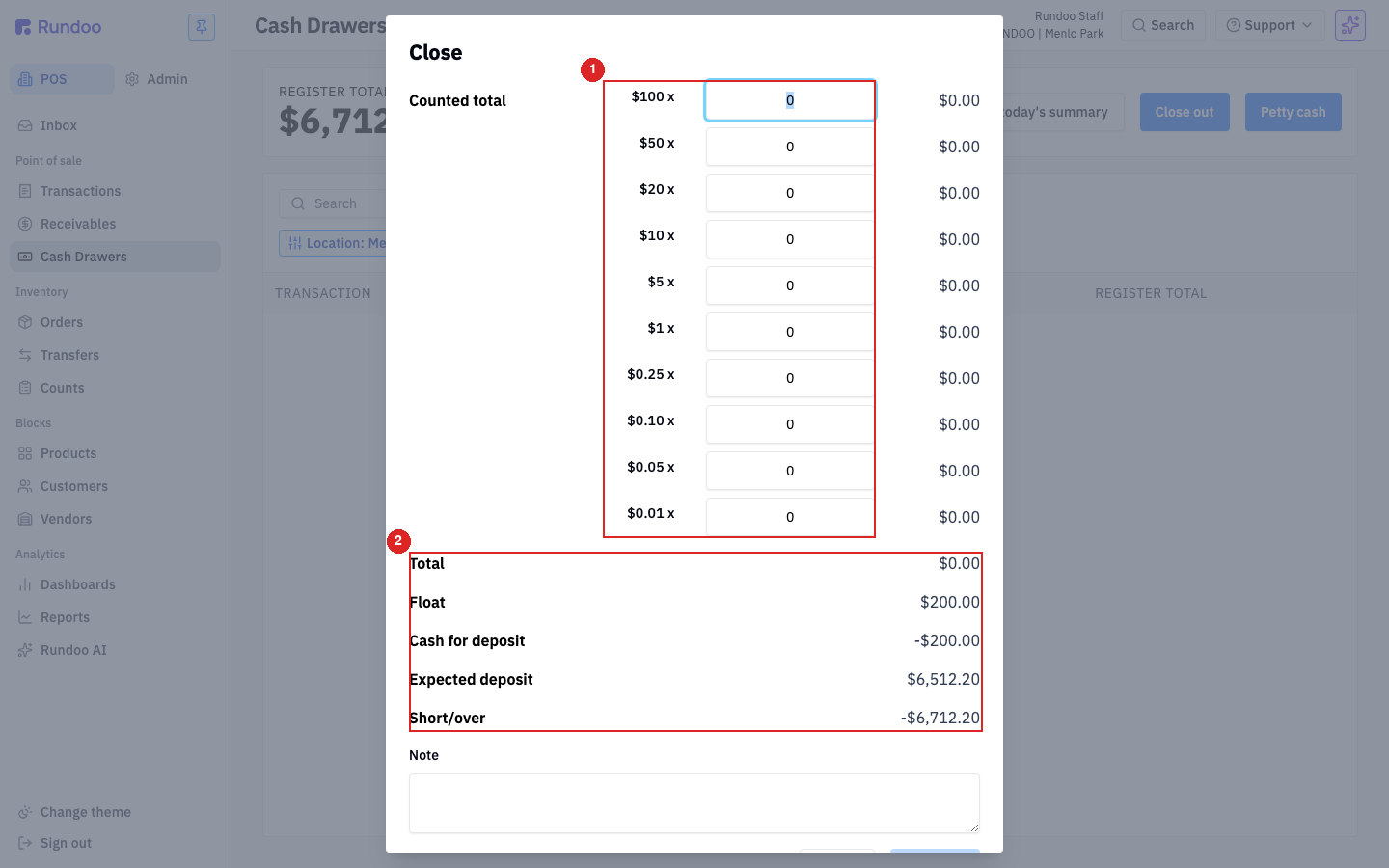
Click Close out in the action cluster. The Close modal walks you through a denomination-by-denomination count:
-
For each bill and coin (
$100,$50,$20,$10,$5,$1,$0.25,$0.10,$0.05,$0.01), enter the quantity you counted. Rundoo multiplies and shows the dollar value for that row. -
Total. Sum of everything you counted.
-
Float, the starting cash that stays in the drawer overnight (pulled from your location's settings).
-
Cash for deposit (
TotalminusFloat). That's what you'd drop at the bank. -
Expected deposit, what Rundoo calculates the deposit should be, based on today's sales and petty-cash activity.
-
Short/over (
Cash for depositminusExpected deposit). Zero means you balanced. Negative means you're short; positive means you're over. -
Note (required when there's a variance). Say what you think happened (
Found a $20 on the floor after,One customer paid $5 more than rung — missed void).
Click Close out at the bottom when everything's counted and any variance is explained.
Speed-up: type the total as pennies. Instead of clicking through every denomination row, count the cash, then enter the whole amount as pennies in the $0.01 row. $487.32 in the drawer? Type 48732 in the pennies count. Rundoo multiplies it back to dollars in the Total row, same answer, one input. Useful when the drawer's right and you don't need the per-denomination paper trail.
Recovering from a long-uncounted drawer
Drawer hasn't been closed in days (or weeks)? Don't try to reconstruct each day. You'll lose. The cleanest path:
-
Count what's in the drawer right now. Pull every bill and coin, count once, write down the total.
-
Subtract the float. Whatever should stay in the drawer overnight comes off the top. That's the deposit you'd be making.
-
Close out today's session with that count. The
Short/overwill absorb every uncounted day's drift into one big variance. Explain in the Note (First close-out since {date}, drift across multiple days). -
If you're way over (cash accumulated past the float), drop the excess via Petty cash > Withdraw with a note like
Excess cash to safe/bank, then close out clean. That moves the excess off the register without leaving it as a positive variance forever.
Don't close to the same Short/over value every day. Variances of $0 every day across a chain of cashiers is a sign someone's force-balancing rather than counting, either by always entering the expected total, or by skimming/padding to make it match. Real drawers have small drift. If your store sees suspicious zeroes, ask managers to review individual close-outs in Past drawer sessions.
⚠️ A non-zero Short/over means the cash in the drawer doesn't match what Rundoo calculated. Don't ignore it, and don't close without investigating. Common causes: a petty-cash pull that wasn't logged (see Step 1), a miscounted denomination (recount), change given on a no-cash tender (receipt trail), or a bill stuck behind the insert.
Past drawer sessions
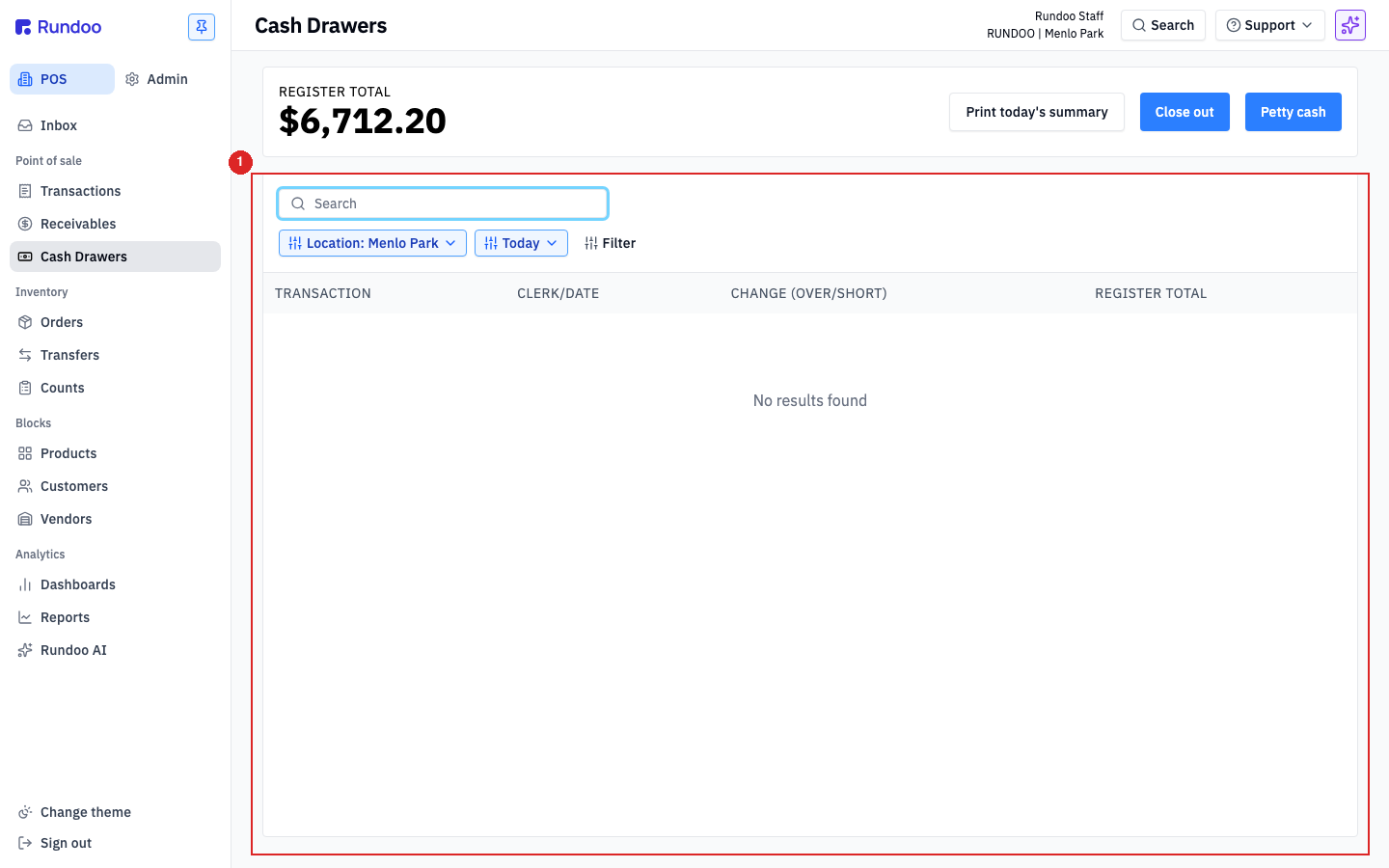
The table on the main page is your audit log. Every row is one cash movement (a cash sale, a refund given in cash, a petty-cash withdrawal or deposit, and the day's close-out) with four columns:
-
TRANSACTION, what happened (sale number, petty-cash note, close-out). -
CLERK/DATE, who rang it and when. -
CHANGE (OVER/SHORT)(the drawer-effect amount); for close-outs, this is the variance from that session. -
REGISTER TOTAL(the drawer's running balance after the event).
Use the Today date picker at the top to scroll back to a past day, and Location: Menlo Park to switch between stores. The Search field filters by transaction or note, useful for finding a specific petty-cash entry later.
Print today's summary
Print today's summary in the action cluster prints a running tape for the current day (every sale, every petty-cash movement, tender totals, and the current REGISTER TOTAL). Handy for a mid-shift audit, or to hand a paper summary to whoever's relieving you. This is the same tape many stores call the deposit summary, since it carries the Cash for deposit total. To reprint one from a past day, see Reprinting a past deposit summary below.
Reprinting a past deposit summary (daily summary)
Need to reprint the deposit summary from a past day, say the summary from July 24, 2026, or last Friday's? The end-of-day close-out summary (the one showing Cash for deposit and Expected deposit, which many stores just call the deposit summary) reprints straight from the Past drawer sessions table on the main page:
-
Click the
Todaydate picker at the top and pick the past day. -
The table reloads with that day's transactions and close-out row.
-
Click into the close-out row (the row with the day's
Short/overin theCHANGEcolumn). It opens the close-out detail with the full tender-by-tender summary, denominations entered, and notes. -
Use your browser's Print (
⌘P/Ctrl+P) to print the detail view to your thermal printer or any office printer.
The close-out detail is the same content Print today's summary would have produced on the day, totals by tender, petty-cash movements, sales count, and the Short/over. For an even broader cross-day view (multiple days, multiple registers, exportable to spreadsheet), use Custom reports with the Cash register detail report.
💡 The date picker switches the whole
Past drawer sessionstable to that day; the runningREGISTER TOTALpill above only ever shows today's balance, regardless of what's in the table. Reading a past day? The totals in the table rows are what to trust, not the pill.
How the physical drawer opens
Rundoo's cash drawer is virtual. It's a ledger that tracks what's in the physical till, not a driver that talks to hardware. The physical drawer pops open through the thermal receipt printer it's wired to: when Rundoo fires a receipt, the printer sends the pop signal to the drawer.
Most cash drawers have a 24V port on the bottom (sometimes labeled Cash Drawer or Buzzer) that plugs into the matching port on a Star CloudPrint thermal printer. Once that cable's in place, the drawer opens when you:
-
Finalize a cash or check sale, bill payment, or return.
-
Click Open Cash Drawer from this page (available as part of Petty cash in the action cluster. The drawer pops when the entry posts).
See Hardware setup and Printer troubleshooting for what to check if a sale completes but the drawer stays closed.
Drawer not springing open? Reset the thermal printer first. Because the pop signal travels through the receipt printer, a stuck drawer is almost always a printer issue, especially if the printer is also acting up at the same time. Power-cycle the thermal printer (turn it off, wait about 10 seconds, turn it back on), let it finish starting up, then ring a test cash sale. That re-arms the drawer signal and clears the most common cause. If it still won't pop, check the RJ-12 cable (the right Cash Drawer port, not LAN, both ends clicked in, ends not reversed). Full steps: Cash drawer won't pop open.
Multiple stations, one drawer
Because the drawer is virtual and the pop signal travels through the thermal printer, multiple checkout stations can share one physical cash drawer if they all print to the same thermal printer. Point both stations at the shared printer in their browser print setup, and each cash sale from either station opens the same drawer.
Multiple drawers at one location
The inverse case. Two physical cash drawers running side-by-side at the same store, each with its own till and its own close-out. Common patterns: a Front-of-house drawer the cashier rings sales from and a Back-of-house drawer for back-counter contractor pickups, or a per-shift drawer that gets handed off at change-of-shift.
Configure the drawers in Admin > Locations > {your location}. The Cash drawers section lets you add named drawers (e.g. Front of house, Back of house) and set a starting cash / float per drawer. Each drawer reconciles independently. The Cash Drawers left tab in POS lists them separately, and Close out runs against the drawer the cashier is signed in to.
💡 Pick the right drawer when you sign in. With multiple drawers configured, Rundoo asks which drawer this register is using on sign-in. A cashier on the wrong drawer pollutes both close-outs, if you spot the mismatch mid-shift, log a
Petty cashmovement to back the cash out of the wrong drawer and into the right one, with a note explaining the swap.
Recommended Rundocs
-
Sales. How cash becomes a sale, and how split payment stacks cash with other tenders.
-
Drafts, quotes & will-calls, when a cash-paying customer isn't ready to complete the sale.